Track & Trace
Providing Real-Time Container Visibility to Eliminate Manual Tracking Enquiries, Improve Logistics Planning, and Reduce Operational Burden on Customer Service Teams.
TL;DR
We built the Track & Trace module for Partner Shipping — giving customers instant, self-service access to container movement data sourced directly from operational datalake systems. By entering a container number, bill of lading, or booking reference, users retrieve a chronological timeline of tracking events integrated into both a public track page and the authenticated booking dashboard. Business value delivered: deflected support enquiries, improved customer trust through transparency, and enabled proactive supply chain planning.
Problem Overview
Shipment visibility gaps create predictable costs across the logistics relationship. Each "where is my container?" call represents a support cost, a delay in the customer's supply chain planning, and an erosion of trust when response times vary.
- Reactive status updates — customers learn container location only when they ask, not when it changes
- Reference confusion — shippers hold container numbers, BL references, or booking numbers but don't know which to use or whether the format is valid
- No dashboard integration — even customers with active bookings must separately enquire about tracking rather than seeing progress alongside booking details
- Limited sharing — shippers who want to give consignees or partners visibility must manually relay updates
- Operational system lockout — tracking data lives in internal systems customers cannot access directly
Role & Responsibilities
- Role: Full-stack development team
- Responsibilities:
- Design and build the Track & Trace module as part of the broader Partner Shipping platform
- Implement multi-reference lookup supporting container numbers, bill of lading references, and booking numbers with automatic type detection
- Build automatic reference validation with a structured three-outcome error taxonomy
- Integrate with enterprise operational datalake for authoritative container event data
- Build public track page for anonymous lookups and booking dashboard tracking tab for authenticated users
- Deliver chronological event timeline covering port arrivals, departures, vessel transfers, gate movements, and delivery milestones
- Implement shareable tracking link generation for third-party visibility without account provisioning
- Build lookup activity logging for operational analytics and demand pattern analysis
- Implement performance-optimised retrieval from unified API serving both public and authenticated access
Project Context
- Client: Global container shipping carrier — Partner Shipping Company
- Industry: Maritime logistics — container tracking, shipment visibility, and B2B customer self-service
- Purpose: Eliminate the single highest-volume customer service need in container shipping — reactive shipment status enquiries — by providing instant, self-service access to authoritative container movement data across multiple reference types and access channels
- Constraints: Tracking events must be sourced from the enterprise operational datalake — not manually maintained status fields; reference type must be auto-detected without requiring users to know the lookup category; three distinct error outcomes must each guide users with specific, actionable messages; shareable links must enable third-party access without platform registration
My Approach
We designed the Track & Trace module around five principles that addressed the full scope of the visibility problem — not just the moment of lookup, but the reference confusion that preceded it, the sharing friction that followed it, and the dashboard disconnection that made tracking feel like a separate service rather than part of the booking relationship.
- Multi-reference support: Container, BL, or booking number accepted — type auto-detected so shippers use whatever reference they have without needing to know which category it falls into
- Operational data authority: Events sourced from enterprise datalake, not manually maintained status fields — tracking reflects actual container movements across the carrier network
- Dual access: Public track page for anonymous lookups; dashboard integration for registered users — the same capability available to anyone with a reference number and to authenticated shippers within their booking context
- Clear error taxonomy: Invalid reference, tracking unavailable, and successful retrieval each with distinct user guidance — no generic error messages that leave users without a path forward
- Shareable links: Shippers provide partner and consignee visibility without account provisioning — extending the value of the tracking module beyond the authenticated customer to the full supply chain
Research & Insights
Key Findings from Discovery
- Shipment status enquiries were the single highest-volume inbound support request — a self-service tracking capability would deflect more calls than any other single feature in the platform
- Reference confusion was a significant source of failed self-service attempts in other carrier tools — shippers holding a booking reference could not track using a container-number-only lookup; automatic type detection was essential for meaningful self-service adoption
- Shippers regularly needed to share tracking visibility with consignees and logistics partners who were not registered on the platform — shareable links were a practical operational requirement, not an edge case
- Registered customers found it illogical to manage their bookings in the dashboard and then navigate elsewhere for tracking — integrating the tracking tab into booking detail views was the most important contextual design decision in the module
- Generic error messages on invalid references drove additional support calls rather than resolving the issue — a structured error taxonomy with specific guidance was as important as the successful retrieval path
Competitive Research
- Most carrier tracking tools accepted only a single reference type — container number only or BL only — requiring customers to know which format to use and resulting in high failed lookup rates for customers holding alternative references
- Tracking was universally implemented as a standalone page disconnected from booking management — no carrier in the comparable space had integrated tracking into the booking detail dashboard view
- Shareable tracking links enabling third-party visibility without account registration were absent from all comparable carrier self-service tools
User Persona
- Name: Natasha
- Role: Supply Chain Manager, B2B shipper coordinating multiple active shipments
- Goals: Check container location on demand without calling the carrier, share visibility with consignees without provisioning platform accounts, see tracking progress alongside booking details in one place
- Pain Points: Not knowing which reference type to use in the tracking tool, receiving generic error messages that offer no resolution path, having to navigate away from booking management to check tracking, manually emailing status updates to consignees
Information Architecture
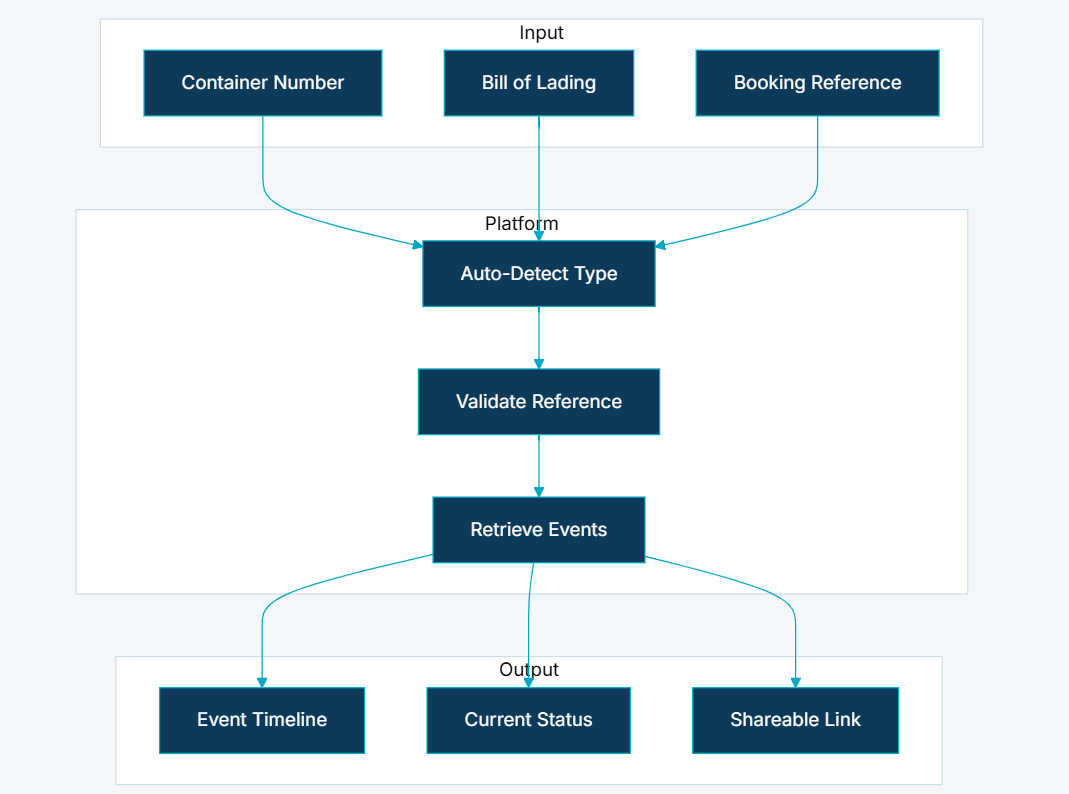
- Multi-Reference Lookup — container numbers, bill of lading references, and booking numbers all supported; platform auto-detects reference type and applies the correct lookup logic without requiring users to select a category
- Automatic Reference Validation — invalid formats, unsupported references, and temporarily unavailable data return structured messages with specific guidance — three distinct outcomes, each directing users toward a resolution path
- Operational Datalake Integration — tracking events retrieved from enterprise operational systems reflecting actual container movements across the carrier network; no manually maintained status fields
- Booking Dashboard Integration — registered users access tracking from booking detail views; shipment progress displayed alongside booking information, documents, and compliance status in the same tab
- Chronological Event Timeline — port arrivals and departures, vessel transfers, gate movements, and estimated delivery milestones presented in customer-friendly chronological format
- Shareable Tracking Links — shippers generate URLs providing container visibility to consignees, partners, or end customers without platform registration or account provisioning
- Lookup Activity Logging — tracking enquiries logged for operational analytics, supporting capacity planning and demand pattern analysis without retaining sensitive shipment details beyond lookup events
- Public and Authenticated Access — anonymous visitors track from the public website; registered users benefit from dashboard integration and contextual booking linkage; both served from a unified API
Visual Language
The Track & Trace interface was designed to be immediately usable by anyone holding a shipment reference — no training, no format guidance required before entry. The auto-detection of reference type removed the most common point of friction in self-service tracking tools. The chronological event timeline used plain-language event descriptions and clear timestamps so shippers could interpret container movements without operational knowledge of port codes or carrier terminology. The three error states were each designed to feel helpful rather than terminal — invalid reference guided users to correct format; tracking unavailable confirmed the reference was valid but explained that data was not currently available; successful retrieval presented the full timeline immediately. The shareable link was surfaced as a single copy action on the tracking result page, requiring no navigation or account management to generate.
Wireframes & Early Ideas
Early wireframes focused on two moments: the lookup entry and the event timeline display. The decision to auto-detect reference type — rather than ask users to select container, BL, or booking from a dropdown before entry — was made during the first wireframing session and was the single design decision that most determined self-service success rates. A dropdown selection approach was prototyped and rejected because it required knowledge that shippers frequently did not have, recreating the confusion that drove support calls. The booking dashboard integration was scoped during wireframing as a tab within the booking detail view — not a link to the public track page — after it became clear that authenticated shippers expected tracking to be available within their booking context, not as a navigation away from it. The three-outcome error taxonomy was specified during wireframing as a first-class requirement: generic errors were explicitly excluded from all design options.
Designing Solutions
Problem: Reactive status updates — customers learn container location only when they ask, not when it changes
- Built on-demand self-service tracking accessible without contacting customer service — shippers check container location at any point in the shipment lifecycle without waiting for a manual response
- Booking dashboard integration surfaces tracking within the customer's existing workflow — progress visible alongside booking details so status is part of the continuous booking relationship, not a separate enquiry
Problem: Reference confusion — shippers don't know which reference type to use or whether the format is valid
- Implemented intelligent automatic reference type detection — container numbers, bill of lading references, and booking numbers all accepted in a single input field with the platform detecting type and applying the correct lookup logic without user selection
- Three-outcome error taxonomy provides specific, actionable guidance for invalid formats rather than generic error messages — shippers know exactly what went wrong and how to correct it
Problem: No dashboard integration — active booking customers must separately enquire about tracking
- Integrated tracking as a dedicated tab within the booking detail view in the Customer Dashboard — shipment progress displayed alongside booking information, documents, and compliance status so registered customers never need to leave their booking context to check container location
Problem: Limited sharing — shippers manually relay updates to consignees and partners
- Built shareable tracking link generation from the tracking result page — shippers copy a URL that provides full container visibility to consignees, logistics partners, or end customers without requiring platform registration or account provisioning on either side
Problem: Operational system lockout — tracking data lives in internal systems customers cannot access
- Integrated directly with the enterprise operational datalake — tracking events reflect actual container movements across the carrier network, not manually curated status updates that lag behind operational reality
- Performance-optimised retrieval from a unified API serves both public and authenticated access, ensuring instant visibility expectations are met across both access channels
User Journey
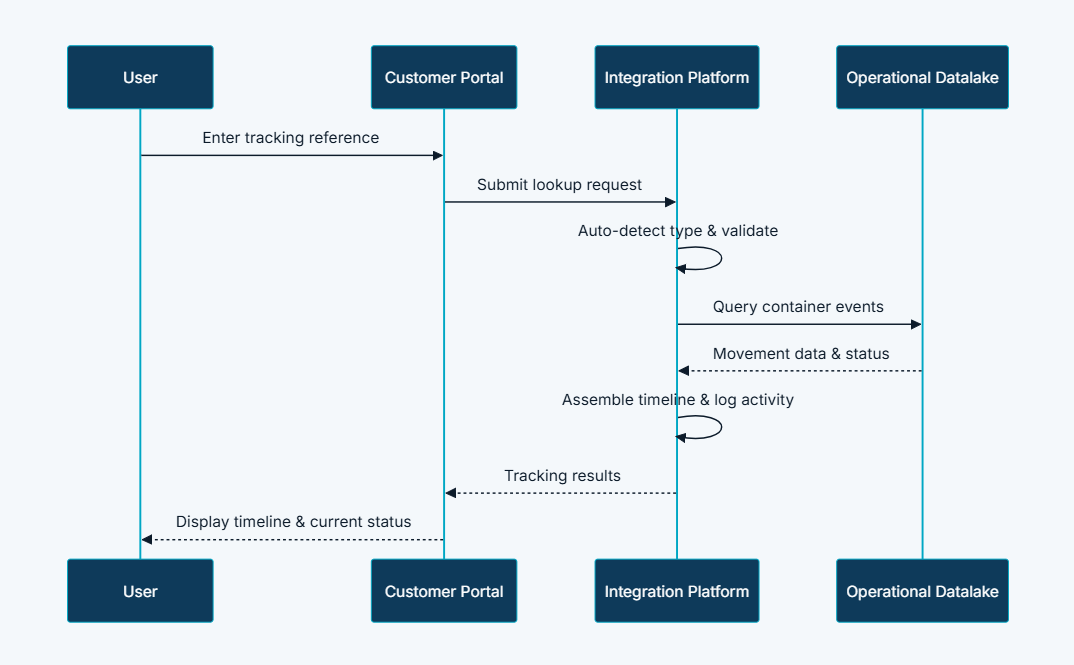
- Enter reference — user submits a container number, BL, or booking number on the public track page or booking dashboard tracking tab; platform accepts the input for processing
- Auto-detect — platform identifies the reference type automatically; guides the user if the format is ambiguous
- Validate — platform verifies the reference against operational records; returns structured error guidance if the reference is invalid or currently unavailable
- Retrieve — platform queries the operational datalake for all container events associated with the validated reference
- Display — user views a chronological event timeline covering port arrivals, departures, vessel transfers, gate movements, and estimated delivery milestones in customer-friendly format
- Share (optional) — user generates a shareable link enabling third-party visibility without account provisioning
Functional Workflow
The lookup flow produces three distinct outcomes, each with its own resolution path:
- Invalid reference — the submitted reference does not match a valid format; user is guided to the correct reference format with specific, actionable instructions
- Tracking unavailable — the reference is valid but no current tracking data is available from the datalake; user is informed the reference is recognised but data is temporarily unavailable
- Successful retrieval — tracking events are found; full chronological event timeline is presented immediately with all available milestones
Tech & Implementation
- Customer Portal: Public track page for anonymous lookups; booking dashboard tracking tab for registered users; shareable link generation
- Integration Platform: Reference validation, type detection, datalake queries, timeline assembly, and activity logging
- Content Management: FAQ content explaining reference types and tracking capabilities linked from the public track page
- External Services: Operational datalake for authoritative container event data
- Intelligent reference auto-detection: Identifying container, BL, and booking reference types without requiring users to select lookup category
- Enterprise datalake integration: Authoritative operational data sourced directly from carrier systems — not manually maintained status fields
- Structured error taxonomy: Three distinct outcomes improving user guidance and reducing support escalations from failed lookups
- Dual access model: Public and authenticated access served from a unified API with consistent data and performance characteristics
- Activity logging: Tracking enquiries logged for analytics without retaining sensitive shipment details beyond the lookup event
- Performance-optimised retrieval: Supporting instant visibility expectations across both public and dashboard access channels
Real-world Features & Highlights
- Multi-reference lookup → container numbers, bill of lading references, and booking numbers all accepted; type auto-detected without user selection
- Automatic reference validation → structured three-outcome error taxonomy — invalid reference, tracking unavailable, successful retrieval — each with specific user guidance
- Operational datalake integration → tracking events sourced from enterprise operational systems; reflects actual container movements, not manually curated status updates
- Booking dashboard integration → tracking tab within booking detail view; shipment progress visible alongside booking information, documents, and compliance status
- Chronological event timeline → port arrivals and departures, vessel transfers, gate movements, and delivery milestones in customer-friendly format
- Shareable tracking links → shippers generate visibility URLs for consignees and partners without platform registration required
- Public and authenticated access → anonymous visitors use public track page; registered users access tracking within dashboard booking context; unified API serves both
- Lookup activity logging → enquiry volume tracked by route and reference type for demand analytics and capacity planning
Results & Impact
- Faster processing: Instant self-service lookups eliminate wait time for customer service responses — shippers get container location on demand without raising an enquiry
- Reduced manual effort: Support teams handle fewer tracking enquiries; no manual relay of status updates to customers or their supply chain partners
- Better customer experience: On-demand visibility enables proactive supply chain planning and accurate delivery expectation management for shippers, consignees, and partners
- Improved visibility: Shippers, consignees, and partners share a single source of truth for shipment status — sourced from operational systems, not manually relayed updates
- Support deflection: Public track page and shareable links enable self-service for the highest-volume enquiry type without requiring platform registration on either side
- Operational insight: Lookup activity logs reveal demand patterns by route, reference type, and access channel — supporting capacity planning and customer behaviour analysis
Challenges & Learnings
- Reference auto-detection accuracy — correctly identifying whether an input was a container number, bill of lading reference, or booking number required handling a range of formats across all three types, including partial matches and near-valid inputs; the detection logic had to be both precise enough to route correctly and forgiving enough to guide users who entered slightly malformed references toward the correct format
- Datalake integration performance — retrieval from the enterprise operational datalake had to meet instant visibility expectations despite the volume and complexity of the underlying event data; performance-optimised queries and caching for frequently accessed routes were essential to preventing the lookup from feeling slow
- Three-outcome error taxonomy UX — designing error states that felt helpful rather than terminal required more iteration than the successful retrieval path; the distinction between "invalid reference" and "tracking unavailable" in particular needed to be communicated in plain language that shippers understood without operational context
- Shareable link security — links providing container visibility to unauthenticated third parties needed to be constructed so that they did not expose other shipment data or allow enumeration of the carrier's operational records; the link scope had to be precisely bounded to the specific container event timeline without wider data access
- Dual access model consistency — ensuring that the same underlying data and performance characteristics served both the public track page and the authenticated dashboard integration required careful API design; inconsistency between what anonymous and authenticated users saw for the same reference would have created support calls rather than deflecting them
Takeaways
- Tracking is the highest-volume self-service opportunity in container shipping: No other single feature in the platform had the potential to deflect as many support interactions as on-demand container visibility — prioritising it as a foundational module rather than a supplementary feature was the right architectural decision
- Auto-detection is the difference between self-service and self-service failure: A lookup tool that requires users to know their reference type before they can use it recreates the confusion that drove support calls; removing the selection step was the design decision that most determined adoption success
- Dashboard integration transforms tracking from a service to a relationship: Moving tracking from a standalone page into the booking detail view changed how shippers perceived the carrier — container progress was part of the booking relationship, not a separate enquiry to a separate tool
- Shareable links extend value beyond the platform boundary: The ability to share tracking visibility with consignees and partners without account provisioning turned a customer-facing feature into a supply chain collaboration tool — the module delivered value beyond the authenticated user to the full logistics network
- Error states are part of the product: A tracking tool with no path forward from a failed lookup adds frustration rather than deflecting support calls; the three-outcome error taxonomy was as important as the successful retrieval path in determining whether self-service actually worked
Next Steps
- Proactive milestone notifications — push alerts to registered customers when container events occur, moving the tracking experience from reactive lookup to proactive event-driven communication
- Estimated arrival prediction — integrating carrier schedule data with tracking events to surface ETA calculations alongside historical movement timelines
- Multi-container tracking view — enabling shippers managing multiple active shipments to view the status of several containers simultaneously without separate lookups
- Consignee tracking portal — a lightweight dedicated view for consignees accessing tracking via shareable links, with a consistent branded experience appropriate for end-customer delivery expectations
- Mobile tracking — extending the tracking capability to a mobile application for on-the-go shipment visibility with push notification integration for milestone events
More Partner Shipping modules
Each capability is a self-contained module within the same platform ecosystem.
Client Feedback
"Track and Trace transformed our highest-volume support problem into a self-service capability. Our customer service team used to handle a constant stream of 'where is my container?' calls — that call simply does not happen at anywhere near the same volume now. Shippers check status themselves, share links with their consignees, and see tracking alongside their booking details without navigating anywhere. The shareable link feature alone has changed how our customers manage their downstream supply chain relationships."
— Customer Experience Manager, Partner Shipping Company
Track & Trace addresses the single highest-volume customer service need in container shipping — shipment visibility — through instant, self-service access to operational data. Integrated into the booking dashboard, tracking becomes part of the continuous customer journey rather than a separate service request, reinforcing Partner Shipping's value as a unified digital front door to Container Shipping's services.
Call to Action
If you're looking to eliminate reactive shipment status enquiries and give your customers instant, self-service container visibility integrated directly into their booking workflow, contact us at WhizCloud — we'd love to partner with you.
Contact Us