Claims Management
Transforming Cargo Claims Management Through Transparent Digital Workflows, Streamlined Documentation, and Real-Time Status Visibility for Customers and Internal Teams
TL;DR
We built the Claims Management module for Partner Shipping — a dedicated portal connected to the main platform through shared authentication, replacing unstructured email-based claims handling with a guided three-stage submission wizard, mandatory evidence enforcement, a defined status lifecycle, an administrator review dashboard, structured settlement negotiation, and enterprise system handoff. Business value delivered: faster claim intake, complete evidence on first submission, transparent resolution, and auditable handoff to back-office systems.
Problem Overview
Traditional cargo claim handling creates friction during an already difficult customer moment. For a carrier managing regulated cargo and insurance claims, the absence of a structured digital claims process meant extended resolution timelines, high administrative overhead, and damaged customer trust at precisely the moment the carrier most needed to demonstrate reliability.
- Unstructured email submissions — claims handlers manually extract data from narrative descriptions, consuming time and introducing transcription errors
- Incomplete evidence — missing bills of lading, invoices, or survey reports trigger days of document-chasing before review can begin
- No status visibility — customers repeatedly call or email to ask "where is my claim?" generating high support volume with no self-service alternative
- Email-based settlement negotiation — offers, acceptances, and disputes lack a structured audit trail, creating governance gaps and dispute risk
- Manual enterprise re-entry — approved claims re-keyed into back-office systems, introducing delay, data error, and duplicated administrative effort
- No admin prioritisation — handlers work from unstructured inboxes rather than prioritised, filterable queues, making workload management difficult
Role & Responsibilities
- Role: Full-stack development team
- Responsibilities:
- Design and build the Claims Management module as a dedicated portal connected to the Partner Shipping platform via shared authentication
- Build guided three-stage submission wizard with draft persistence across sessions
- Implement mandatory evidence enforcement — required document categories specified upfront with file type and size validation before storage
- Design and implement the defined status lifecycle from Pending Review through to Settled, Rejected, Submitted to Enterprise System, Dispute Raised, and Closed
- Build administrator review dashboard with filtered, searchable, paginated claim queues and prioritised handler assignment
- Implement document request workflow — administrators select specific additional documents; customers fulfil via dedicated submission screen
- Build structured settlement offer and dispute workflow with documented terms and timestamped accept or dispute actions
- Implement enterprise system handoff routing approved claims with enriched structured data to back-office processing systems
- Build cross-portal single sign-on bridge from Customer Portal to Claims Portal
- Implement claim administrator management with dedicated roles for inviting, activating, and managing claim handler accounts
- Deliver email notifications at every claim status transition for both customers and administrators
- Implement audit logging across all claim actions, uploads, and status transitions
Project Context
- Client: Global container shipping carrier — Partner Shipping Company
- Industry: Maritime logistics — cargo claims, insurance resolution, and B2B customer post-incident management
- Purpose: Replace opaque, email-driven claims handling with a structured digital workflow that captures complete evidence at submission, gives customers transparent status visibility throughout resolution, and delivers approved claims to enterprise processing systems with zero manual re-entry
- Constraints: Claims portal must operate as a dedicated environment while sharing authentication with the Customer Portal via cross-portal SSO; mandatory evidence enforcement must hard-block submission until all required categories are fulfilled; every claim action, upload, and status transition must be auditable; enterprise handoff must deliver structured, enriched data — not a document — to back-office systems
My Approach
We designed the Claims Management module around the reality that a cargo claim arrives at the worst possible moment in the customer relationship — after something has gone wrong. Every design decision was made to reduce friction, increase transparency, and demonstrate to the shipper that the carrier was taking the claim seriously. The guided wizard eliminated the blank-page problem of email claims. Mandatory evidence enforcement meant complete submissions arrived every time. The shared status lifecycle gave customers visibility without requiring them to call. And the structured settlement workflow ensured that negotiation was documented and defensible.
- Guided over open: A three-stage wizard with explicit steps replaced the open-ended email submission that allowed customers to omit critical information inadvertently
- Enforce at intake, not at review: Mandatory evidence categories blocked submission rather than generating a review-stage discovery — complete claims from the first submission
- Shared status lifecycle: The same status model visible to both customers and administrators eliminated the information asymmetry that drove "where is my claim?" support calls
- Dedicated environment, shared identity: The Claims Portal operated as a separate application appropriate to its regulatory and administrative context, while cross-portal SSO meant shippers never had to re-authenticate when moving from booking management to claims filing
Research & Insights
Key Findings from Discovery
- The highest volume of claims-related support calls was status enquiries — "where is my claim?" — a category of call that a shared visible status lifecycle would eliminate entirely
- Missing evidence at submission was the primary cause of claims processing delay — not administrator capacity; enforcing mandatory document collection at intake was the highest-impact single improvement identified
- Settlement negotiation by email created governance exposure — when disputes arose over whether an offer had been accepted and on what terms, neither party had a reliable record; structured offer and dispute workflows with timestamps were a compliance requirement, not just a convenience
- Manual re-entry of approved claims into back-office systems was generating data errors that affected settlement calculations downstream — enterprise handoff with structured data was an operational accuracy requirement
- Handlers working from unstructured inboxes were unable to prioritise by claim value, age, or complexity — an administrator dashboard with filter and search capability was essential for workload management at scale
Competitive Research
- Most carriers handled cargo claims entirely by email with no digital intake, no status tracking, and no structured settlement workflow — the claims process was the most consistently manual part of the carrier digital experience
- Where digital claim submission existed, it was typically a basic form with no mandatory evidence enforcement and no status visibility after submission — the digital experience ended at intake
- Cross-portal SSO between booking management and claims filing was absent from all comparable carrier tools — customers managed separate sessions and sometimes separate credentials for the two workflows
User Persona
- Name: Rachel
- Role: Cargo Claims Coordinator, B2B shipper
- Goals: Submit a cargo claim with all required evidence in one session, track claim status without calling the carrier, understand settlement terms clearly before accepting, receive confirmation when the claim is resolved
- Pain Points: Not knowing what documents to include in an email claim, receiving no acknowledgement after submission, calling repeatedly for status updates, receiving settlement offers with no structured accept or dispute mechanism
Information Architecture
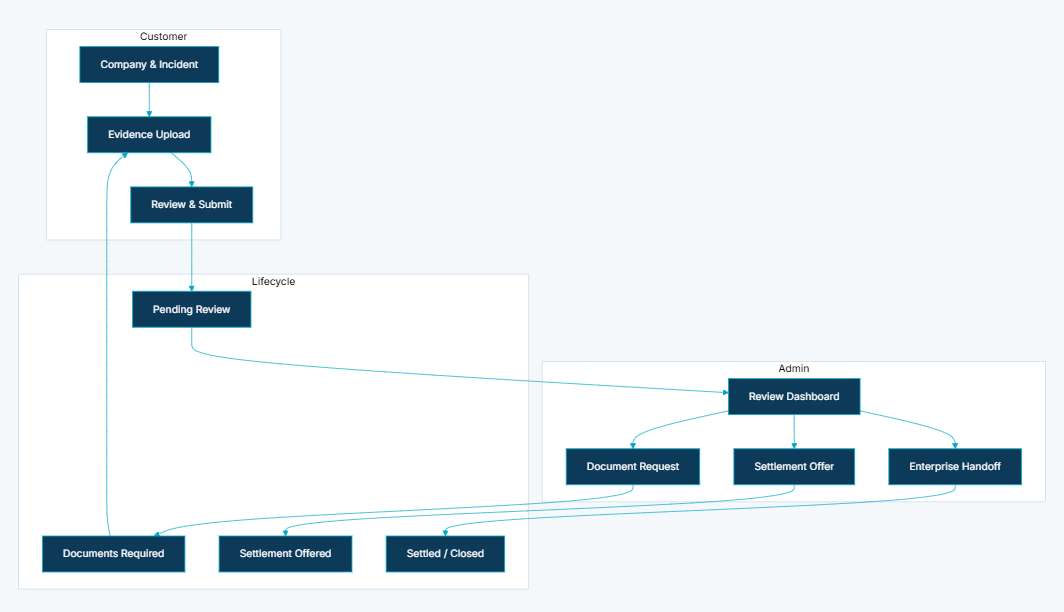
- Guided Three-Stage Submission Wizard — structured progression through company details, incident description, and cargo information (Stage 1); mandatory evidence upload — bills of lading front and back, shipper invoice, packing list, formal claim statement (Stage 2); review summary and final submission (Stage 3); draft persistence across sessions so customers can complete over multiple visits without data loss
- Mandatory Evidence Enforcement — required document categories specified upfront; file type and size validation before storage; submission blocked until all mandatory categories are fulfilled — no path to proceed with missing evidence
- Defined Status Lifecycle — Pending Review → Documents Required → Settlement Offered → Settled / Rejected / Submitted to Enterprise System / Dispute Raised / Closed; shared visibility for customers and administrators across all transitions
- Administrator Review Dashboard — filtered, searchable, paginated view of all claims; prioritised queue management for claim handlers; handler assignment for workload distribution
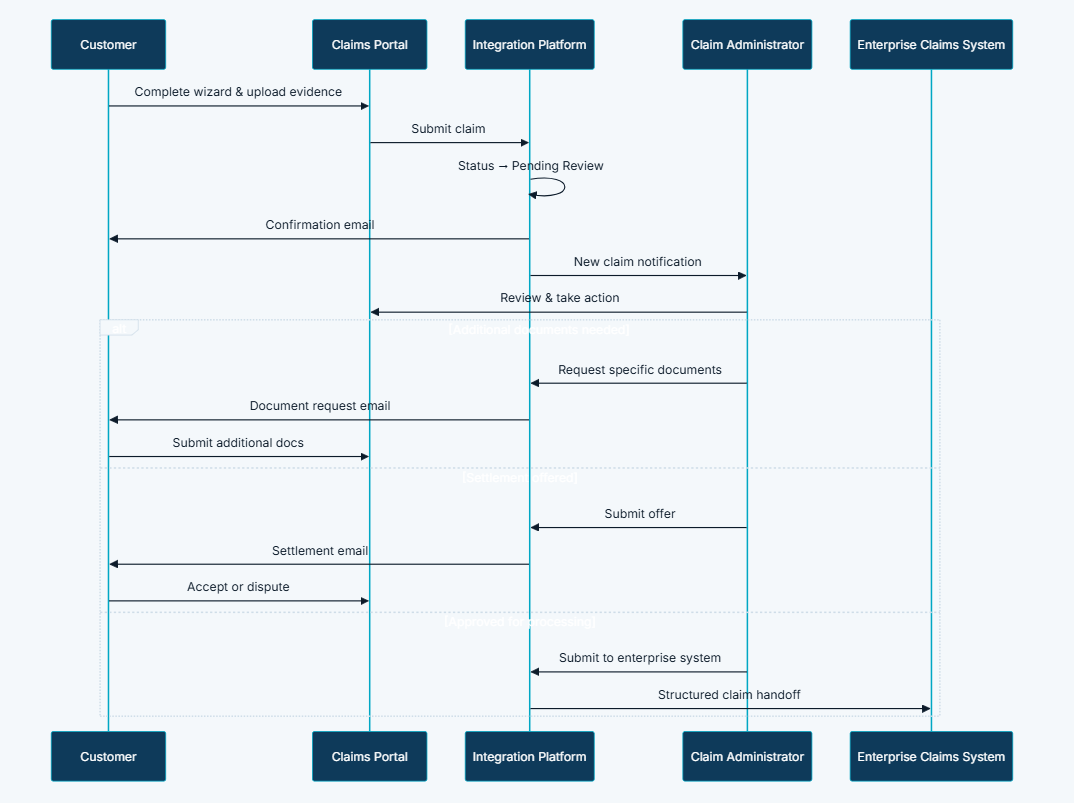
- Document Request Workflow — administrators select specific additional document types from a configured list; customers notified by email; customers fulfil via dedicated submission screen linked to their claim; claim returns to review queue on fulfilment
- Settlement Offer and Dispute Workflow — structured offer with documented terms; customer accepts (status → Settled) or disputes (status → Dispute Raised, returned to review); all actions timestamped for audit
- Enterprise System Handoff — approved claims submitted to enterprise processing systems with enriched structured data; status updates to Submitted to Enterprise System; back-office processing begins without manual re-entry
- Cross-Portal Single Sign-On — seamless session transfer from Customer Portal to Claims Portal via secure token validation; no re-authentication required when moving between shipment management and claims filing
- Claim Administrator Management — dedicated roles for inviting, activating, and managing claim handler accounts with appropriate access boundaries and role-scoped dashboard access
- Customer Claims Dashboard — ongoing status visibility for all submitted claims; additional document submission screen; settlement offer acceptance and dispute actions
Visual Language
The Claims Portal was designed to feel calm and authoritative — appropriate for a workflow that customers engage with after a cargo incident, not a routine transaction. The three-stage wizard used clear progress indicators and plain-language stage labels so customers always knew how much remained and what was coming next. Mandatory document requirements were displayed prominently at the evidence stage — not discovered as validation errors — so customers could gather what they needed before starting the upload. The administrator dashboard prioritised scanability: claim reference, current status, days open, and assigned handler visible in the list view without drilling into individual records. Settlement offer screens presented terms in structured, readable format with explicit accept and dispute buttons that made the decision moment unambiguous.
Wireframes & Early Ideas
Early wireframes centred on two critical moments: the mandatory evidence upload stage of the wizard and the settlement offer screen. The evidence stage was the most complex to design because it needed to communicate clear requirements without overwhelming customers who were already dealing with a stressful situation. The decision to display mandatory document categories as a checklist — showing what was required, what had been uploaded, and what remained — before the upload control rather than after a failed submission was the wireframing decision that most reduced submission errors. The settlement offer screen was prototyped through several iterations to ensure the accept and dispute actions were visually balanced — neither option should feel like the obvious or discouraged choice. The enterprise system handoff was scoped during wireframing as an explicit status transition visible to both customers and administrators, rather than a silent back-end event, so all parties had shared awareness that back-office processing had begun.
Designing Solutions
Problem: Unstructured email submissions — handlers manually extract data from narrative descriptions
- Built a guided three-stage submission wizard that captures company details, incident description, and cargo information in structured fields — no narrative extraction required; all data arrives in the correct format for immediate review
- Draft persistence across sessions means customers can complete submissions over multiple visits without data loss, removing the time pressure that led to incomplete email submissions
Problem: Incomplete evidence — missing documents trigger days of document-chasing before review can begin
- Implemented mandatory evidence enforcement that blocks final submission until all required document categories — bills of lading front and back, shipper invoice, packing list, formal claim statement — contain at least one uploaded file
- File type and size validation runs before storage — invalid files are rejected with specific error messages before they enter the system, preventing processing failures downstream
Problem: No status visibility — customers repeatedly call to ask "where is my claim?"
- Designed and implemented a defined status lifecycle — Pending Review, Documents Required, Settlement Offered, Settled, Rejected, Submitted to Enterprise System, Dispute Raised, Closed — with shared visibility for both customers and administrators
- Email notifications fire at every status transition, so customers are informed of changes without needing to log in and check; the customer dashboard provides on-demand status access at any point in the lifecycle
Problem: Email-based settlement negotiation — offers and acceptances lack structured audit trail
- Built a structured settlement offer workflow where administrators issue documented offers with explicit terms; customers accept (transitioning the claim to Settled) or dispute (returning the claim to Dispute Raised for further review)
- Every action in the settlement workflow is timestamped — offer issuance, acceptance, dispute — creating a complete, defensible record of the negotiation for both parties
Problem: Manual enterprise re-entry — approved claims re-keyed into back-office systems introducing delay and error
- Implemented enterprise system handoff that submits approved claims with enriched structured data directly to back-office processing systems — no manual re-entry, no transcription error, and claim status updates to Submitted to Enterprise System to give all parties shared awareness that processing has begun
Problem: No admin prioritisation — handlers work from unstructured inboxes rather than prioritised queues
- Built an administrator review dashboard with filtered, searchable, paginated claim views — handlers filter by status, age, assigned handler, and other criteria to manage workload by priority rather than inbox order
- Handler assignment capability routes claims to the responsible administrator for accountability and workload distribution across the claims team
Claim Status Lifecycle
- Pending Review — claim submitted successfully; confirmation email sent to customer; claim enters administrator review queue
- Documents Required — administrator has requested specific additional evidence; customer notified by email with document list and submission link
- Settlement Offered — administrator has issued a structured settlement offer; customer notified with offer terms and accept or dispute options in the portal
- Settled — customer has accepted the settlement offer; claim resolved; confirmation email sent to both parties
- Rejected — claim assessed as not valid; customer notified with documented reason; claim closed
- Submitted to Enterprise System — approved claim forwarded to back-office processing with enriched structured data; back-office resolution begins
- Dispute Raised — customer has disputed the settlement offer; claim returned to administrator review queue for further assessment
- Closed — claim lifecycle complete
Tech & Implementation
- Claims Portal: Submission wizard, customer dashboard, admin review dashboard, document request workflow, settlement offer and dispute actions, handler assignment, claim admin management
- Customer Portal: Entry point, cross-portal SSO bridge, navigation links from booking context to claims filing
- Integration Platform: Claim lifecycle management, document storage orchestration, email notification triggers, status transition processing, enterprise system handoff
- Content Management: Claims FAQ, policy pages, and terms linked from wizard and confirmation emails
- External Services: Cloud document storage, email delivery, enterprise claims processing system
- Dedicated portal architecture: Claims workflow isolated in its own application environment while sharing platform authentication and document services
- Multi-stage draft persistence: Spanning multiple sessions so customers can complete submissions over several visits without data loss
- Flexible workflow state model: Supporting multiple administrative action types — document request, settlement offer, rejection, enterprise handoff, dispute — from the same claim record
- Secure document handling: Validation, file type and size limits, cloud storage, and authenticated retrieval integrated with the platform-wide document management service
- Role-based access: Restricting admin capabilities to authorised claim handlers; claim administrator management for account lifecycle governance
- Cross-domain SSO: Seamless session transfer between Customer Portal and Claims Portal via secure token validation
- Enterprise integration: Routing approved claims with enriched structured data to back-office processing systems at the point of approval
Real-world Features & Highlights
- Guided three-stage submission wizard → structured progression with draft persistence; customers complete over multiple sessions without data loss
- Mandatory evidence enforcement → required document categories block submission until fulfilled; file type and size validation before storage
- Defined status lifecycle → Pending Review through to Settled, Rejected, Submitted, Dispute Raised, and Closed; shared visibility for customers and administrators
- Administrator review dashboard → filtered, searchable, paginated claim queues with handler assignment for prioritised workload management
- Document request workflow → administrators select specific additional document types; customers notified by email; claim returns to review queue on fulfilment
- Structured settlement offer and dispute → documented terms, timestamped accept and dispute actions, complete negotiation audit trail
- Enterprise system handoff → approved claims submitted with enriched structured data; zero manual re-entry into back-office processing systems
- Cross-portal SSO → seamless session transfer from Customer Portal to Claims Portal without re-authentication
- Claim administrator management → dedicated roles with access boundaries for inviting, activating, and managing claim handler accounts
- Email notifications at every transition → customers and administrators informed of every status change without manual relay
- Audit logging → every claim action, document upload, and status transition logged with timestamps for governance and dispute resolution
Results & Impact
- Faster processing: Structured submissions with required evidence reduce document-chasing cycles — claims advance to review immediately rather than waiting for missing documents
- Reduced manual effort: Digital intake eliminates email extraction; enterprise handoff removes manual re-entry; administrator dashboard replaces unstructured inbox management
- Better customer experience: Guided submission and shared status visibility transform the claims experience during a stressful post-incident moment — customers feel informed and in control rather than waiting in silence
- Improved visibility: Shared lifecycle eliminates "what is the status of my claim?" enquiries — status visible to both parties at every stage without support intervention
- Audit compliance: Every action, upload, and status transition logged with timestamps — complete audit trail for governance, dispute resolution, and regulatory review
- Settlement transparency: Structured offer and dispute workflow creates a documented negotiation record — both parties have a reliable timestamped account of what was offered, when, and how it was resolved
Challenges & Learnings
- Mandatory evidence UX without creating abandonment — hard-blocking submission on missing documents was the right call for processing completeness, but required careful UX design to communicate requirements clearly enough that customers could act rather than feel frustrated; displaying the required document checklist before the upload step, rather than after a failed submission, was the design decision that made enforcement feel helpful rather than punitive
- Flexible workflow state model — a claim can follow multiple resolution paths (settlement, rejection, enterprise handoff, dispute) from the same record; designing a state model that supported all paths without creating mutually exclusive transitions required careful modelling of which states could transition to which, and which administrator actions were available at each stage
- Enterprise handoff data integrity — the structured data submitted to the enterprise back-office system had to match the back-office's expected format precisely; any field mismatch created processing failures that were difficult to diagnose and correct; the handoff mapping required detailed alignment work with the enterprise system specification
- Cross-portal SSO security — the token used to transfer an authenticated session from the Customer Portal to the Claims Portal had to be short-lived and single-use to prevent replay attacks, while remaining invisible to the user; balancing security rigour with seamless UX required careful token design and expiry handling
- Draft persistence across multi-stage wizard — saving partial claim state reliably across sessions without creating orphaned drafts or confusing customers who returned to incomplete submissions required the draft lifecycle to be a first-class concept in the data model, with clear visual signposting on return to an in-progress claim
Takeaways
- Claims is the trust test: How a carrier handles a cargo claim is the moment that most defines the customer relationship — a structured, transparent digital process demonstrates reliability when it matters most, turning a potentially damaging incident into a demonstration of operational professionalism
- Enforcement at intake pays downstream dividends: Every minute invested in designing mandatory evidence requirements and the UX that enforced them at submission saved many hours of document-chasing, re-submission, and review delay — the strictness of intake directly determined the speed of resolution
- Shared status is a support reduction mechanism: The single most effective way to reduce "where is my claim?" support calls was to make the answer always available to the customer without calling — shared lifecycle visibility was the cheapest support ticket the platform never had to handle
- Structured settlement protects both parties: Timestamped offer, acceptance, and dispute records protected the carrier from claims of unfair settlement and protected customers from disputed offer terms — the audit trail was not just a compliance feature, it was a relationship protection mechanism
- Dedicated environment, shared platform: Running claims in a dedicated portal appropriate to its regulatory and administrative context while sharing authentication, documents, and notifications with the main platform was the architectural decision that made both the security model and the user experience coherent simultaneously
Next Steps
- AI-assisted claim triage — automatically categorising incoming claims by type, value, and complexity to pre-populate the administrator queue with prioritisation scores before any human review
- Automated document completeness checking — scanning uploaded evidence for legibility and content before submission is accepted, flagging documents that are clearly incomplete or unreadable at upload rather than at review
- Claims analytics dashboard for management — resolution time by claim type, settlement rate, document request frequency, and handler performance metrics to support operational improvement
- Counter-offer capability — enabling administrators to issue a revised offer in response to a dispute rather than returning the claim to full review, shortening the settlement negotiation cycle
- Mobile claims submission — giving shippers the ability to initiate and track claims from mobile devices, including photo upload directly from a device camera for on-site damage documentation
More Partner Shipping modules
Each capability is a self-contained module within the same platform ecosystem.
Client Feedback
"Claims Management transformed the most difficult part of our customer relationship. Before, a cargo incident meant weeks of email back-and-forth, incomplete submissions, and frustrated customers calling for updates. Now claims arrive complete on first submission, customers can see exactly where their claim stands at any point, and our administrators work from a prioritised dashboard rather than an overflowing inbox. The enterprise handoff has also eliminated the re-keying errors that were affecting our settlement calculations. We handle claims faster, more accurately, and with far less stress on both sides."
— Claims Operations Director, Partner Shipping Company
Claims Management completes the Partner Shipping customer lifecycle — from schedule discovery and booking through tracking and, when needed, dispute resolution. By transforming opaque email chains into a structured, transparent digital workflow, Container Shipping demonstrates reliability at the moment customers most need it.
Call to Action
If you're looking to replace manual, email-driven claims handling with a structured digital workflow that delivers complete evidence on first submission, transparent status visibility, and auditable settlement negotiation, contact us at WhizCloud — we'd love to partner with you.
Contact Us