Document Management
Transforming Fragmented Document Handling into a Unified Digital Repository That Links Files with Transactions, Reduces Manual Effort, and Improves Compliance Visibility
TL;DR
We built the Document Management module for Partner Shipping — a platform-wide service providing centralised upload, validation, cloud storage, and retrieval for all document workflows across bookings, claims, and compliance submissions. Customers attach supporting documents during booking and claim submission. Administrators access evidence directly from review dashboards. Compliance documents link to specific booking records. Every file is validated, stored securely, and associated with its parent transaction — creating an auditable document trail across the shipment lifecycle. Business value delivered: complete evidence on first submission, eliminated document-chasing, secure cloud storage, and audit-ready attachment records.
Problem Overview
Document handling in manual logistics workflows creates recurring operational costs. For a carrier handling regulated cargo and insurance claims, document integrity is both an operational efficiency issue and a compliance requirement.
- Email attachments disconnected from transactions — operations manually match documents to bookings or claims, consuming time and introducing matching errors
- No file type or size enforcement — oversized or unsupported files clog inboxes and fail to process, creating delays that stall the entire transaction
- Missing mandatory documents discovered late — claims and bookings stall while handlers request evidence that should have been collected at submission
- No central retrieval — customer service searches email archives to resend documents, consuming time and creating version control risks
- Dangerous goods declarations without supporting files — compliance gaps and regulatory risk from DG shipments processed without mandatory declaration attachments
- No audit trail for document versions — disputes lack evidence of what was submitted and when, undermining both customer trust and legal defensibility
- Inconsistent upload experience — different workflows use different upload mechanisms, creating confusion and inconsistent document capture quality
Role & Responsibilities
- Role: Full-stack development team
- Responsibilities:
- Design and build Document Management as a platform-wide service supporting all document workflows across bookings, claims, and compliance
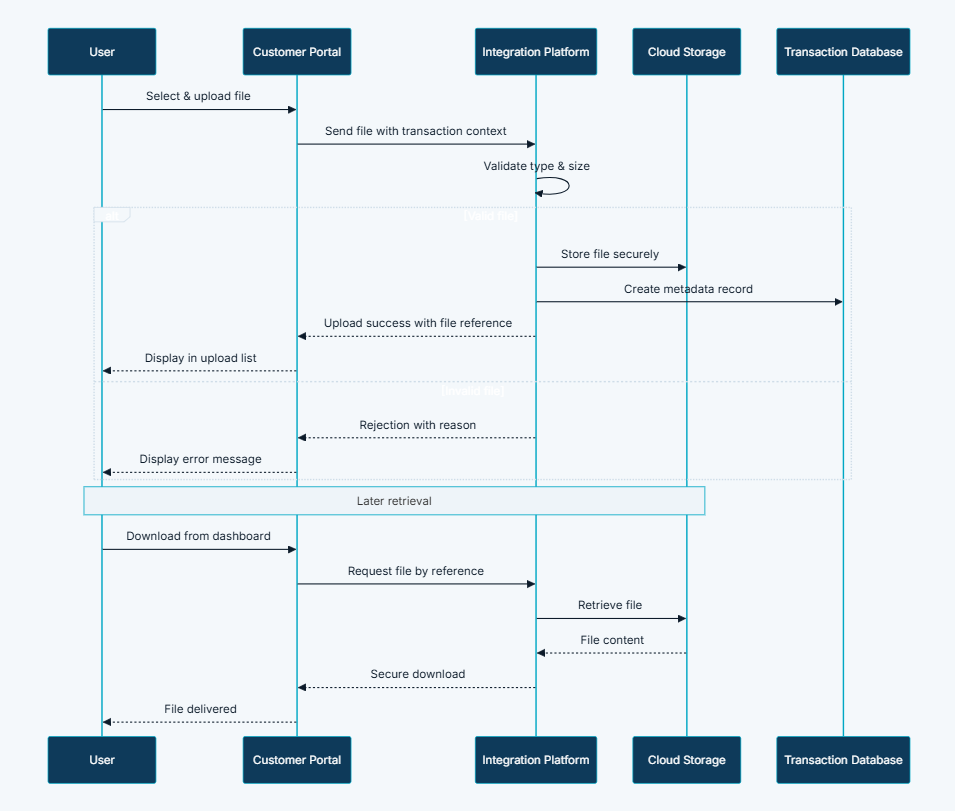
- Implement validated upload interface with drag-and-drop and file-picker support, enforcing file type, size, and count limits before upload begins
- Build cloud storage integration with secure authenticated retrieval for customers and administrators
- Implement transaction-linked metadata model recording original filename, file size, document type, upload timestamp, form context, and parent transaction reference
- Build mandatory document enforcement blocking claim submission until all required evidence categories are fulfilled
- Implement document type classification for claims evidence with typed categorisation
- Build admin-requested additional document workflow with customer notification and submission screen
- Deliver download capability from booking detail, claim detail, and compliance dashboard views
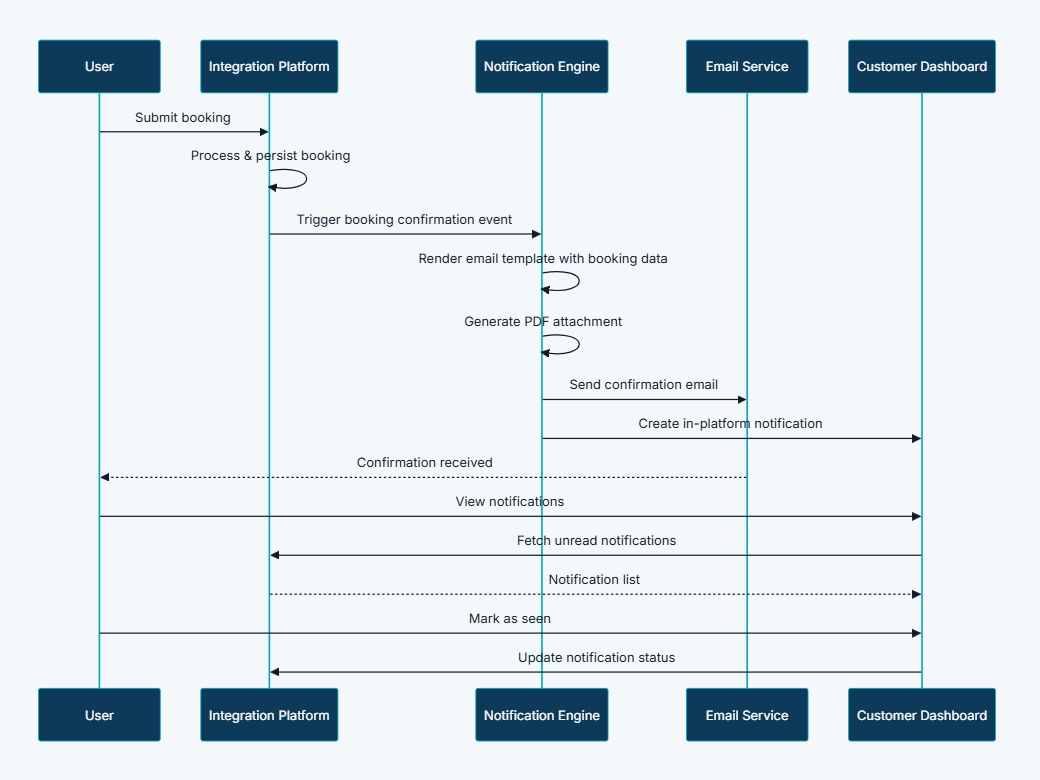
- Implement PDF generation and email attachment for booking confirmations, quote summaries, and claim details
- Build amendment document support linking attachments to amendment records
- Implement asynchronous upload processing to prevent file transfer from blocking form interaction
Project Context
- Client: Global container shipping carrier — Partner Shipping Company
- Industry: Maritime logistics — cargo compliance, claims management, and B2B document operations
- Purpose: Replace disconnected email attachment workflows with a unified document service that captures, validates, stores, and links every supporting file to its parent transaction — making complete evidence collection the default, not the exception, across bookings, claims, and compliance submissions
- Constraints: Every document must be linked to a parent transaction record — unlinked file storage is not acceptable; file type and size validation must run both client-side and server-side independently; mandatory document enforcement must block submission rather than warn; all storage must be cloud-native with authenticated retrieval; asynchronous upload must not block form interaction
My Approach
We designed Document Management as a platform-wide service rather than a feature within any individual module — because document workflows cut across bookings, claims, compliance, and notifications, and a fragmented approach would recreate the inconsistency problem the module was designed to solve. The architecture was built around six design principles that shaped every capability decision.
- Transaction-linked: Every document associated with a parent booking, claim, or compliance record — no file exists without a transactional context
- Validated at upload: File type, size, and count enforced before storage — invalid files rejected with clear messages before they enter the system
- Cloud-native storage: Documents stored in enterprise cloud storage with secure authenticated access — no local file handling, no email attachment archaeology
- Metadata-rich: Original filename, file size, document type, upload timestamp, and form context recorded for every file — making every document discoverable and auditable
- Retrieval on demand: Customers and administrators download documents from dashboard context without separate email requests or archive searching
- Email integration: Confirmation PDFs and claim summaries attached to notification emails — generated documents part of the same document ecosystem as user uploads
Research & Insights
Key Findings from Discovery
- Operations teams were spending significant time manually matching email attachments to their corresponding bookings and claims — a task that a transaction-linked upload system would eliminate entirely
- Claims processing was regularly stalled not by administrator capacity but by missing mandatory evidence that was only discovered at the review stage — enforcing mandatory document collection at submission was the highest-impact single improvement identified
- Dangerous goods shipments were being processed with missing declaration attachments, creating regulatory exposure that the business considered unacceptable
- Customer service teams were searching email archives to resend documents that customers had requested again — a retrieval problem that dashboard-based download access would solve permanently
- Different upload mechanisms across different workflows were creating inconsistent document quality — a unified service with consistent validation would standardise document capture across the platform
Competitive Research
- Most carrier platforms handled document submission entirely by email — there was no structured upload capability, no validation, and no transaction-linked storage in any comparable tool
- Where document upload existed in carrier portals, it was typically implemented independently per workflow with inconsistent validation and no shared metadata model
- Mandatory document enforcement at submission — blocking completion until all required evidence was present — was absent from all comparable carrier platforms; missing documents were discovered at review, not prevented at intake
User Persona
- Name: Elena
- Role: Claims Manager, container shipping carrier
- Goals: Receive complete evidence on first claim submission, access all supporting documents from the claim review dashboard without searching email archives, request additional specific document types when needed, maintain an auditable record of all evidence submitted
- Pain Points: Manually matching email attachments to claim records, discovering missing mandatory documents at review stage, searching email archives to retrieve previously submitted files, no audit trail of what was submitted and when
Information Architecture
- Validated Upload Interface — drag-and-drop and file-picker upload with real-time validation; accepted types (PDF, images, spreadsheets, Word documents) and size limits enforced before upload begins; invalid files rejected with clear error messages
- Cloud Storage with Secure Access — documents stored in enterprise cloud storage; access controlled through authenticated API — customers retrieve their own documents, administrators access review-context documents
- Transaction-Linked Metadata — every upload creates a metadata record: original filename, stored filename, file size, document type classification, upload timestamp, form context, and parent transaction reference
- Mandatory Document Enforcement — claim submission wizard blocks final submission until all required evidence categories contain at least one uploaded file; booking dangerous goods workflows require declaration attachments before proceeding
- Document Type Classification — claims evidence supports typed categorisation — survey report, quality certificate, photographs — enabling administrators to request and track specific evidence types
- Admin-Requested Document Workflow — administrators select required additional documents from a configured list; customer fulfils via dedicated submission screen; new uploads linked to existing claim record
- Download from Dashboard — customers and administrators download documents from booking detail, claim detail, and compliance views without separate email requests
- PDF Generation and Attachment — platform generates PDF summaries (booking confirmations, quote summaries, claim details) and attaches them to notification emails — part of the same document ecosystem as user uploads
- File Size and Count Limits — per-file and total upload limits enforced per workflow context, preventing storage abuse and ensuring processable submission sizes
- Amendment Document Support — booking amendment workflows support attachment of supporting documents for proposed changes, linked to amendment records
Visual Language
The document upload interface was designed to make the requirement clear and the action simple. Accepted file types and size limits were displayed inline with the upload control — not buried in help text — so customers knew what was needed before selecting files. Validation feedback was immediate and specific: a rejected file displayed exactly why it was rejected (wrong type, too large) rather than a generic error. The review screen before submission showed every uploaded file with its name and size, giving customers confidence that their documents had been captured correctly. Administrators saw the same structured document list in the review dashboard, with download access from the same screen they used to evaluate claims and bookings.
Wireframes & Early Ideas
Early wireframes focused on two critical moments: the booking dangerous goods upload flow and the claim submission wizard. The decision to enforce mandatory document collection as a hard block — preventing submission until all required evidence categories were fulfilled — was made during wireframing and was the most consequential design decision in the module. An alternative approach of warnings rather than blocks was considered and rejected because it would have recreated the missing-documents-at-review problem the module was designed to solve. The admin-requested additional document workflow was scoped during wireframing after discovery revealed that administrators regularly needed to request specific evidence types that were not captured at initial submission — building this as a structured workflow rather than an email request was the difference between a trackable process and an unauditable back-channel.
Designing Solutions
Problem: Email attachments disconnected from transactions — operations manually match documents to bookings or claims
- Built every upload interface to link documents to their parent transaction at the point of upload — every file is associated with a booking, claim, or compliance record before it reaches storage, eliminating the manual matching step entirely
- Transaction-linked metadata records original filename, document type, upload timestamp, and parent transaction reference — every document is immediately discoverable through its transaction context
Problem: No file type or size enforcement — oversized or unsupported files clog inboxes and fail to process
- Implemented client-side and server-side validation enforcing accepted file types (PDF, images, spreadsheets, Word documents) and size limits before upload begins — invalid files are rejected with specific, actionable error messages before they enter the system
- Per-file and total upload limits enforced per workflow context, preventing storage abuse and ensuring submission sizes are processable by downstream systems
Problem: Missing mandatory documents discovered late — claims and bookings stall while handlers request evidence
- Implemented mandatory document enforcement that blocks final claim submission until all required evidence categories contain at least one uploaded file — missing documents cannot be submitted around, they must be provided before the wizard advances
- Dangerous goods booking workflows require declaration attachments before cargo submission proceeds — regulatory compliance gaps are prevented at intake, not discovered at review
Problem: No central retrieval — customer service searches email archives to resend documents
- Built download capability directly into booking detail, claim detail, and compliance dashboard views — customers and administrators retrieve any previously uploaded document without raising a support request or searching email archives
- Secure authenticated API controls retrieval — customers access only their own documents; administrators access documents within their review context
Problem: Dangerous goods declarations without supporting files — compliance gaps and regulatory risk
- Integrated mandatory DG document requirements into the dangerous goods cargo workflow — MSDS sheets and dangerous goods declarations are required uploads before the cargo section can be completed, creating a compliance gate rather than a compliance reminder
Problem: No audit trail for document versions — disputes lack evidence of what was submitted and when
- Every upload creates a metadata record with original filename, stored filename, file size, document type classification, upload timestamp, form context, and parent transaction reference — a complete, immutable evidence trail for every document in the platform
- Admin-requested additional document workflow links new uploads to existing claim records with their own metadata entries — the full submission history for any claim is traceable from the record, not reconstructed from email threads
Problem: Inconsistent upload experience — different workflows use different upload mechanisms
- Built a unified upload service consumed by booking, claim, and compliance workflows — the same validation rules, the same metadata model, the same cloud storage, and the same retrieval API serve every document context in the platform
- Consistent drag-and-drop and file-picker interface across all upload contexts gives customers a predictable experience regardless of which workflow they are in
Document Contexts
Booking Documents
- Packing lists — optional during booking; purpose: cargo verification
- Certificates — optional during booking; purpose: commodity or quality certification
- Dangerous goods declarations — mandatory for DG cargo; purpose: regulatory compliance
- MSDS sheets — mandatory for DG cargo; purpose: safety data for hazardous materials
- Supporting correspondence — optional; purpose: additional booking context
Claim Evidence
- Bill of lading (front and back) — mandatory at submission; purpose: proof of shipment
- Shipper's commercial invoice — mandatory at submission; purpose: cargo value evidence
- Packing/weight list — mandatory at submission; purpose: cargo condition evidence
- Formal claim statement — mandatory at submission; purpose: claim declaration
- Survey report — optional or on request; purpose: independent damage assessment
- Quality certificate — optional or on request; purpose: product condition evidence
- Photographs — optional; purpose: visual damage evidence
- Additional documents (admin-requested) — on demand; purpose: specific evidence requested by claim handler
Compliance Documents
- VGM supporting documents — Verified Gross Mass submission; purpose: regulatory weight verification
- ESI attachments — Electronic Shipping Instructions; purpose: shipping instruction documentation
Tech & Implementation
- Customer Portal: Upload interfaces in booking, claim, and compliance workflows; download from dashboard detail views
- Claims Portal: Evidence upload in claim wizard; additional document submission; admin document review
- Integration Platform: Validation, cloud storage orchestration, metadata persistence, secure retrieval, and email attachment assembly
- Cloud Storage: Authoritative file storage with regional deployment
- External Services: Email delivery with PDF attachments; PDF generation for confirmation documents
- Unified upload endpoint: Single service serving booking, claim, and compliance workflows with consistent validation and storage behaviour
- Client-side and server-side validation: File type and size enforced independently at both layers — server-side validation cannot be bypassed by client manipulation
- Cloud storage integration: Secure, authenticated retrieval with role-based access scoping
- Metadata model: Linking files to parent transactions with document type classification and full provenance recording
- Asynchronous upload processing: File transfer decoupled from form interaction — uploads process in the background without blocking the customer's ability to continue completing the form
- Configurable document type lists: Managed through platform configuration, allowing new document types to be added without code changes
- Production CDN: Static claim document assets and generated PDFs served via CDN for consistent global performance
Real-world Features & Highlights
- Validated upload interface → drag-and-drop and file-picker with real-time type and size enforcement; invalid files rejected with specific error messages before entering the system
- Transaction-linked metadata → every file records original filename, size, type, timestamp, form context, and parent transaction reference — complete provenance for every document
- Mandatory document enforcement → claim submission blocked until all required evidence categories are fulfilled; DG bookings require declaration attachments before cargo section completes
- Cloud storage with secure access → enterprise cloud storage with authenticated API retrieval scoped by customer and administrator role
- Document type classification → claims evidence typed by category — survey report, quality certificate, photographs — enabling specific evidence tracking and admin-requested workflows
- Admin-requested additional document workflow → administrators request specific document types from a configured list; customers fulfil via dedicated submission screen; uploads linked to existing claim record
- Download from dashboard → booking detail, claim detail, and compliance views all provide direct document retrieval without support requests
- PDF generation and attachment → booking confirmations, quote summaries, and claim details generated as PDFs and attached to notification emails
- Amendment document support → supporting documents for booking amendments linked to amendment records for complete change documentation
- Asynchronous upload processing → file transfer never blocks form interaction — customers continue completing submissions while uploads process in the background
Results & Impact
- Faster processing: Complete evidence on first submission eliminates document-chasing cycles — claims and bookings advance immediately rather than waiting for missing files
- Reduced manual effort: No manual matching of email attachments to transaction records — every document arrives pre-linked to its parent booking or claim
- Better customer experience: Clear upload requirements and instant validation prevent submission rejection — customers know exactly what is needed and receive immediate confirmation that their documents have been captured
- Improved visibility: All documents accessible from dashboard context — no archive searching, no support requests to retrieve previously submitted files
- Audit compliance: Metadata records provide evidence of what was submitted, when, and by whom — every document has an immutable provenance trail for dispute resolution and governance review
- Regulatory assurance: Dangerous goods and compliance documents linked to specific transactions — DG compliance gaps prevented at intake rather than discovered at review
Challenges & Learnings
- Mandatory enforcement versus warning design — the decision to hard-block submission on missing mandatory documents rather than show a warning was contested during design; the warning approach was rejected because it would have recreated the missing-evidence-at-review problem; the hard block approach required careful UX design to communicate what was missing clearly enough that customers could act without frustration
- Asynchronous upload state management — decoupling file upload from form interaction required careful client-side state management to ensure that the form submission step correctly included all uploaded file references, even for files still completing upload when the customer attempted to proceed
- Server-side validation independence — ensuring server-side validation ran fully independently of client-side checks required careful endpoint design; any path where a client-validated file could reach storage without server-side confirmation was a compliance risk
- Admin-requested document workflow complexity — building a structured workflow for administrators to request specific document types from a configured list, notify customers, and track fulfilment required coordination between the claims workflow, the notification module, and the document storage layer — three systems that each owned part of the process
- Metadata model extensibility — the metadata model needed to accommodate document contexts that did not exist at initial design; building the form context and document type classification fields as configurable rather than hardcoded meant new workflows could adopt the service without requiring metadata schema changes
Takeaways
- Mandatory enforcement at intake is worth the UX investment: Every hour spent designing clear mandatory document requirements and error messaging at submission saves many more hours of document-chasing, re-submission, and processing delay downstream — the strictness of intake validation is directly proportional to the efficiency of processing
- Transaction linking is the architectural foundation: Every other capability in the module — retrieval, audit trail, admin review, email attachment — depends on documents being linked to their parent transaction at the point of upload; retrofitting this relationship after the fact would have been far more complex and less reliable
- A platform-wide service beats per-workflow implementation: Building a single upload service consumed by every workflow rather than separate upload implementations per module delivered consistency in validation, storage, metadata, and retrieval that would have been impossible to maintain across independent implementations
- Asynchronous upload changes the user experience equation: Background file transfer while the customer continues completing the form was the difference between an upload experience that felt fast and one that felt like waiting — the technical complexity of asynchronous processing paid for itself in customer confidence
- Audit trails protect both parties: Metadata records of what was submitted, when, and by whom protect customers from false claims of missing evidence and protect the carrier from disputes about what was provided — an immutable document provenance trail is not just a governance feature, it is a trust foundation
Next Steps
- Automated document classification using AI to identify document types from uploaded file content — reducing manual type selection and improving metadata accuracy at scale
- Document expiry management for time-sensitive compliance documents — alerting customers and administrators when certificates or declarations approach expiration and need renewal
- Bulk document upload for shippers managing multiple bookings or claims simultaneously — allowing multiple files across multiple transactions to be uploaded in a single session
- Version control for compliance documents — tracking successive versions of declarations and certificates with a full version history linked to the parent transaction
- Virus and malware scanning integration as an additional security layer for all uploaded files before they reach cloud storage
More Partner Shipping modules
Each capability is a self-contained module within the same platform ecosystem.
Client Feedback
"Document Management transformed our claims intake completely. Before, our handlers spent a significant part of every working day chasing missing evidence and manually matching email attachments to claim records. Now every claim arrives with all mandatory documents already attached, and our administrators access everything they need directly from the review dashboard. The audit trail has also been invaluable — we can show exactly what was submitted and when, which has resolved several disputes that would previously have required weeks of email archaeology."
— Claims Operations Manager, Partner Shipping Company
Document Management ensures that the evidence supporting every booking, claim, and compliance submission is captured, stored, and retrievable from the moment of upload — not reconstructed from email archives weeks later. For Container Shipping, this module is the audit foundation that makes digital intake trustworthy: complete submissions, traceable evidence, and secure storage across the full shipment lifecycle.
Call to Action
If you're looking to replace disconnected email attachment workflows with a unified document service that captures, validates, stores, and links every file to its parent transaction — contact us at WhizCloud — we'd love to partner with you.
Contact Us