Booking Request
Digitizing Container Booking Workflows by Automating Data Capture, Reducing Manual Processing, and Improving Accuracy Across Cargo, Compliance, and Documentation Requirements
TL;DR
We built the Booking Request module for Partner Shipping — a guided, multi-step digital workflow that gives authenticated shippers the ability to place ocean freight booking requests with validated cargo capture, dangerous goods compliance, document upload, review-before-submit, email confirmation, and full dashboard lifecycle management including amendments and ESI compliance workflows. Business value delivered: faster booking intake, fewer data errors, reduced operations rework, and a customer experience that matches modern B2B expectations.
Problem Overview
Before structured digital booking, shippers experienced predictable pain at every stage of the booking process. For operations teams, each manual booking represented re-keying risk, processing delay, and a support ticket waiting to happen.
- Incomplete submissions — emails missing commodity codes, container types, or dangerous goods details triggered days of clarification
- No progress persistence — customers who paused mid-booking lost all entered data and restarted from scratch
- Opaque status — after submitting, customers had no visibility into whether the booking was received, under review, or confirmed
- Duplicate entry at conversion — shippers who accepted a quote re-entered identical cargo and route data when placing the booking
- Scattered documents — packing lists, certificates, and DG declarations arrived in separate emails, disconnected from the booking record
- Amendment ambiguity — post-confirmation changes travelled through unstructured email with no audit trail of what changed or who approved it
Role & Responsibilities
- Role: Full-stack development team
- Responsibilities:
- Design and build the Booking Request module as part of the broader Partner Shipping platform
- Implement multi-step guided booking workflow with incremental save and unsaved-changes protection
- Build cargo and dangerous goods capture with mandatory UN number, IMO class, packing group fields, and document upload requirements
- Integrate shipment party capture with saved address book for repeat shipper efficiency
- Implement quote-to-booking conversion with full validated data carry-forward
- Build document upload and attachment with file type and size validation
- Deliver booking review screen, confirmation email, and downloadable PDF generation
- Build amendment workflow with version tracking and audit trail
- Implement Reserve Rate (MRG) booking workflow with distinct validity handling
- Integrate booking dashboard with status views, tracking tab, edit/amendment access, and ESI compliance workflows
- Implement server-side validation independent of client-side checks
Project Context
- Client: Global container shipping carrier — Partner Shipping Company
- Industry: Maritime logistics — ocean freight booking, cargo compliance, and B2B customer operations
- Purpose: Replace email-driven, manual booking intake with a structured digital workflow that delivers complete, validated booking data on first submission — and gives shippers full self-service lifecycle management from confirmation through amendment and compliance
- Constraints: Authentication required for all booking activity; incremental save essential to prevent data loss across multi-step forms; server-side validation must enforce completeness and dangerous goods rules independently of client-side checks; amendment workflow must preserve original booking records while tracking all changes with full audit trail
My Approach
We designed the Booking Request module around the principle that a shipper should never lose work, never submit incomplete data, and never be left wondering what happened after they clicked submit. The multi-step guided workflow with incremental save addressed the data loss problem. Server-side validation at submission addressed the completeness problem. Instant email confirmation with a booking reference and PDF addressed the status opacity problem. Each design decision traced directly back to a documented shipper pain point.
- Progressive disclosure: Broke the booking into logical stages — route, cargo, parties, services, documents, review — so shippers were never confronted with the full complexity of a booking form at once
- Persist early, validate late: Data saved at each step so customers could resume at any point; full validation enforced only at the point of final submission
- Quote carry-forward as the primary entry path: Designed the most common booking journey to start from an accepted quote, carrying all validated data forward and eliminating duplicate entry
- Compliance built in, not bolted on: Dangerous goods workflows, ESI compliance, and amendment versioning were designed as first-class features of the module, not edge cases handled by email
Research & Insights
Key Findings from Discovery
- The most common cause of booking processing delays was incomplete submissions — particularly missing commodity codes, container specifications, and dangerous goods details
- Shippers regularly abandoned mid-booking sessions when interrupted, losing all progress and restarting from scratch — incremental save was the highest-priority feature request from early user sessions
- Post-submission status opacity generated a high volume of inbound enquiries to operations teams asking for confirmation that bookings had been received
- Shippers who converted accepted quotes to bookings were re-entering data they had already submitted in the quote — a frustration that undermined trust in the platform's coherence
- Amendment requests by email had no consistent format or approval process — both shippers and operations teams lacked a shared record of what had changed and who had authorised it
Competitive Research
- Most carrier booking tools offered single-page forms with no draft persistence — any interruption meant starting over
- Dangerous goods compliance workflows were typically handled entirely by email, with no structured capture or document attachment at the point of booking
- Amendment management by email was the industry norm — no competitor offered a versioned amendment workflow with audit trail within the same booking record
User Persona
- Name: David
- Role: Shipping Coordinator, B2B shipper
- Goals: Place ocean freight bookings quickly and accurately, upload compliance documents alongside the booking, track booking status without calling operations, manage amendments without email back-and-forth
- Pain Points: Losing booking progress when interrupted, re-entering data from accepted quotes, no visibility after submission, amendment changes lost in email threads
Information Architecture
- Multi-Step Booking Workflow — progressive form stages covering route selection, company and contact details, cargo and dangerous goods, shipment parties, additional services, document upload, and review; unsaved-changes protection throughout
- Cargo and Dangerous Goods Management — multiple cargo lines per booking with commodity classification, container specifications, and weight; dangerous goods shipments trigger mandatory UN number, IMO class, packing group fields, and document upload requirements
- Shipment Party Capture with Address Book — shipper, consignee, and notify party details with integration to saved address book contacts, eliminating re-entry for repeat shippers
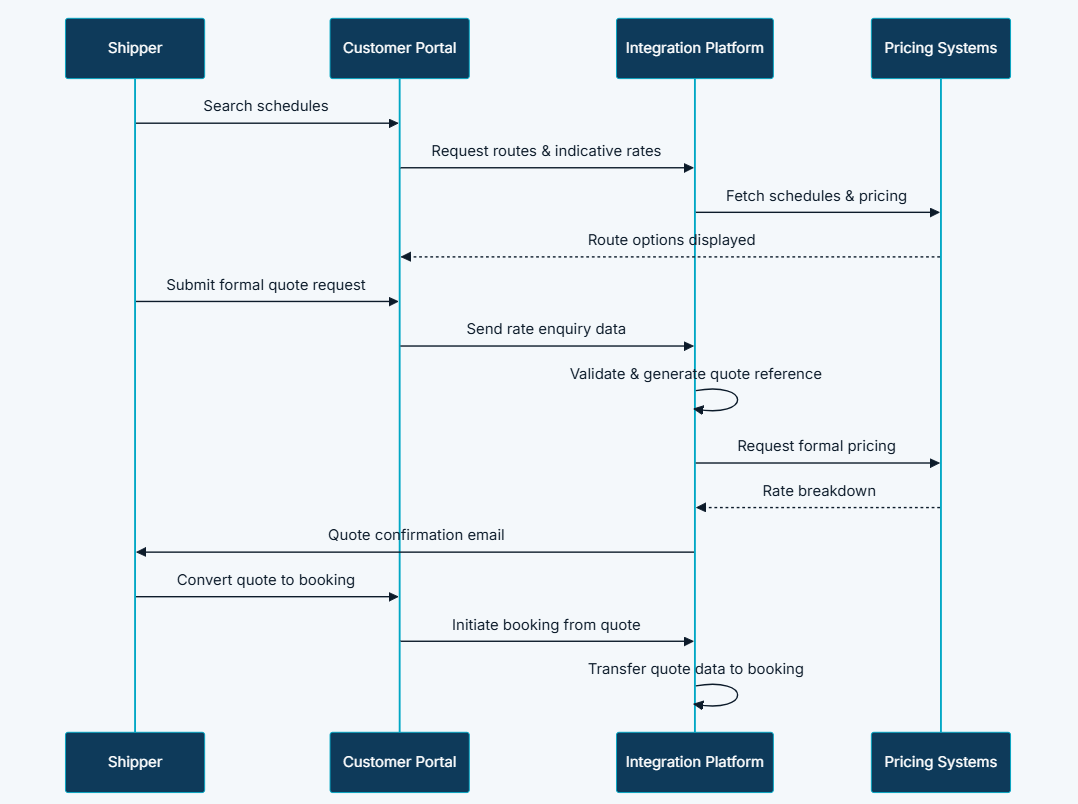
- Quote-to-Booking Conversion — one-click conversion from accepted quote with route, cargo, pricing, and party data transferred automatically, zero duplicate entry
- Document Upload and Attachment — packing lists, certificates, and dangerous goods declarations upload directly to the booking record with file type and size validation
- Booking Review and PDF Confirmation — consolidated review screen before submission; confirmation triggers email with booking reference and downloadable PDF summary
- Amendment Workflow — post-submission changes submitted for operational review with version tracking; original booking preserved while amendments are evaluated
- Reserve Rate (MRG) Bookings — dedicated workflow for market rate guarantee bookings with distinct validity periods and handling logic
- Dashboard Integration — submitted bookings listed with status, detail views, tracking tab, edit and amendment access, and ESI compliance workflows
Visual Language
The booking workflow was designed to feel guided rather than demanding — shippers should always know where they are, what comes next, and that their work is being saved. Progress indicators, step-by-step form stages, and inline validation feedback kept the experience from feeling like a compliance exercise. The review screen before final submission was a deliberate confidence-building step — giving shippers a complete consolidated view of what they were about to commit to, reducing post-submission amendment requests caused by errors made under time pressure.
Wireframes & Early Ideas
Early wireframes focused on two critical moments: the transition from an accepted quote into a booking form, and the dangerous goods declaration flow. The quote-to-booking handoff was prototyped to confirm that pre-populated data was visually distinct from manually entered data, so shippers could quickly verify what had been carried forward. The dangerous goods flow was scoped as a conditional sub-workflow triggered by cargo type selection — keeping the main booking form uncluttered for non-DG shipments while ensuring DG shippers were guided through every required field and document. Draft persistence was designed into the data model from the first wireframe, not added as an afterthought.
Designing Solutions
Problem: Incomplete email submissions missing commodity codes, container types, or dangerous goods details triggered days of clarification
- Built a structured multi-step guided workflow that captures all required fields in a defined sequence — commodity classification, container specifications, weight, and conditional dangerous goods fields are all mandatory before submission is accepted
- Server-side validation enforces completeness and dangerous goods rules independently of client-side checks — incomplete or non-compliant bookings cannot be submitted regardless of how the form is accessed
Problem: Customers who paused mid-booking lost all entered data and restarted from scratch
- Implemented incremental save architecture across all multi-step form stages — data persists at each step and incomplete bookings remain accessible from the dashboard for resumption at any point
- Unsaved-changes protection prevents accidental navigation away from an in-progress step without warning
Problem: After submitting, customers had no visibility into whether the booking was received, under review, or confirmed
- Delivered an instant confirmation package on submission — email notification with unique booking reference and downloadable PDF summary generated immediately, giving shippers proof of receipt before they leave the page
- Dashboard listing with real-time status indicators replaces email-based status enquiries entirely
Problem: Shippers who accepted a quote re-entered identical cargo and route data when placing the booking
- Built one-click quote-to-booking conversion that transfers all validated route, cargo, pricing, and party data automatically into the booking workflow — zero duplicate entry required
- Pre-populated fields are clearly presented in the booking form so shippers can verify carried-forward data before adding any additional booking-specific details
Problem: Packing lists, certificates, and DG declarations arrived in separate emails, disconnected from the booking record
- Implemented document upload directly within the booking workflow — packing lists, certificates, and dangerous goods declarations attach to the booking record at the point of submission with file type and size validation
- All documents are stored centrally and retrievable from the dashboard booking detail view throughout the booking lifecycle
Problem: Post-confirmation amendments travelled through unstructured email with no audit trail
- Built a dedicated amendment workflow where post-submission changes are submitted through the platform for operational review, with version tracking that preserves the original booking record while amendments are evaluated
- Every booking action — submission, amendment request, approval — is logged with timestamps, creating a complete audit trail for operational review and dispute resolution
Tech & Implementation
- Customer Portal: Multi-step booking forms, review screen, confirmation page, dashboard booking views, and amendment editor
- Integration Platform: Validation engine, booking reference generation, record persistence, confirmation orchestration, and operational validation routing
- Content Management: Booking policy pages and terms and conditions linked from confirmation emails
- External Services: Schedule and pricing validation, cloud document storage, email delivery, and PDF generation
- Authentication: Authenticated workflow with session management and role-based access — only registered users can submit bookings
- Incremental save architecture: Multi-step form data persists independently at each stage; draft bookings recoverable from dashboard
- Server-side validation: Field completeness, email format, conditional logic for date vs. vessel selection, and dangerous goods rules enforced independently of client-side checks
- Asynchronous processing: Document upload and PDF generation handled asynchronously to keep submission experience responsive
- Amendment versioning: Original booking records preserved; amendment versions tracked with full change history
- Enterprise integration: Live schedule and pricing validation against operational systems
- Multi-environment deployment: Supporting continuous release cycles across development, staging, and production
Real-world Features & Highlights
- Multi-step guided workflow → shippers progress through logical stages with unsaved-changes protection and no risk of losing work
- Incremental save → bookings persist at every step; interrupted sessions resume from the dashboard without data loss
- Cargo and dangerous goods management → multiple cargo lines with commodity classification, container specs, and mandatory DG sub-workflow for compliant shipments
- Address book integration → shipper, consignee, and notify party details pre-filled from saved contacts for repeat shippers
- Quote-to-booking conversion → one click transfers all validated quote data into the booking form, zero re-entry
- Document upload at booking → packing lists, certificates, and DG declarations attached directly to the booking record with validation
- Instant confirmation package → unique booking reference, email notification, and downloadable PDF generated on submission
- Amendment workflow → post-submission changes follow a versioned review process with full audit trail, not email
- Reserve Rate (MRG) bookings → dedicated workflow with distinct validity periods and handling logic
- Dashboard lifecycle management → status, detail views, tracking tab, edit and amendment access, and ESI compliance workflows all in one place
Results & Impact
- Faster processing: Complete, validated data on first submission eliminates re-keying and clarification cycles for operations teams
- Reduced manual effort: Quote conversion and address book reuse remove duplicate data entry; amendment workflow replaces unstructured email
- Better customer experience: Guided workflow, draft persistence, and instant confirmation build shipper confidence and reduce anxiety around booking status
- Improved visibility: Dashboard status indicators replace email-based enquiries asking whether bookings were received or confirmed
- Higher data quality: Field validation and dangerous goods enforcement reduce incomplete or incorrect submissions reaching operations teams
- Audit compliance: Every booking action logged with timestamps for full operational review capability and dispute resolution
Challenges & Learnings
- Designing incremental save across a complex multi-step form — saving partial booking state reliably without creating orphaned or corrupt records required careful data model design; the draft lifecycle had to be a first-class concept, not a workaround added to a submission-only architecture
- Dangerous goods conditional workflow complexity — DG shipments introduced mandatory sub-fields, document requirements, and validation rules that varied by cargo type; building this as a conditional flow that felt natural to non-DG shippers while being rigorous for DG shippers required significant UX iteration
- Server-side validation independence — ensuring validation ran fully server-side, independent of client-side checks, was essential for compliance integrity; any gap between client and server validation logic could allow non-compliant submissions through
- Amendment versioning without confusing shippers — preserving original booking records while showing the current amendment state required clear version labelling in the dashboard; shippers needed to understand at a glance whether they were looking at the original booking or a pending amendment
- Quote-to-booking data model alignment — carrying all validated quote data forward into the booking record required precise mapping between two data models built at different stages; any field mismatch recreated the re-entry problem the conversion was designed to solve
Takeaways
- Draft persistence is not a nice-to-have — it is a trust feature: Shippers who lose booking progress do not just restart; they lose confidence in the platform entirely; incremental save was the single most impactful reliability improvement in the module
- Compliance built in earns more than compliance bolted on: Dangerous goods workflows and ESI compliance integrated directly into the booking journey produced better data quality and faster processing than any email-based compliance step could achieve
- Instant confirmation changes the relationship: A booking reference and PDF generated immediately on submission eliminated an entire category of post-submission anxiety and inbound status enquiry — shippers felt in control rather than in the dark
- Amendment workflow is a governance investment: Building a versioned amendment process with audit trail cost more upfront than handling changes by email — but it eliminated disputes, reduced rework, and gave operations teams a reliable change record for every booking
- The booking is the anchor of the digital thread: As the primary transaction record in the Partner Shipping platform, the booking connects forward to tracking, compliance, claims, and document management — the quality of that record determines the quality of every downstream experience
Next Steps
- Bulk booking capability for shippers managing multiple container movements on the same route and sailing
- Booking templates for repeat shipment configurations, mirroring the quote template feature to accelerate the full commercial cycle
- Automated dangerous goods compliance checking against regulatory databases at the point of cargo entry
- Mobile booking capability for on-the-go submission and amendment management
- Real-time operational status updates pushed to the dashboard as bookings progress through carrier processing stages
More Partner Shipping Modules
Each capability is a self-contained module within the same platform ecosystem.
Client Feedback
"The Booking Request module has transformed our intake process completely. Our operations team used to spend hours every day chasing incomplete booking emails and re-keying data into our systems. Now bookings arrive complete and validated on first submission. The dangerous goods workflow alone has eliminated an entire category of compliance errors that previously required manual follow-up. And shippers tell us they feel in control for the first time — they know their booking was received the moment they submit it."
— Commercial Operations Manager, Partner Shipping Company
The Booking Request module transforms ocean freight booking from a manual, email-driven intake process into a structured digital workflow. As the anchor transaction module in the Partner Shipping platform, bookings connect forward to tracking, compliance, and claims — creating a continuous digital thread from first enquiry through shipment completion.
Call to Action
If you're looking to digitise your container booking process, eliminate manual re-keying, and give your customers self-service lifecycle management from submission through amendment and compliance, contact us at WhizCloud — we'd love to partner with you.
Contact Us