Content Management
Empowering Business Teams to Manage Content Independently Through a Flexible CMS That Accelerates Publishing and Eliminates Reliance on Development Releases
TL;DR
We built the Content Management module for Partner Shipping — a headless CMS architecture that decouples content from code, empowering business and marketing teams to create, preview, and publish pages using a library of over twenty reusable templates — hero banners, policy documents, staff contact tables, news articles, and tabbed content — delivered to the Customer Portal through a secure integration layer with CDN-backed media delivery. Business value delivered: marketing autonomy, faster time-to-publish, consistent brand presentation, and SEO-optimised content without engineering dependency.
Problem Overview
Content bottlenecks in carrier digital platforms create measurable business drag. For Container Shipping, content agility directly affects market responsiveness — the ability to communicate service changes, regional updates, and promotional offers at the speed of the business.
- Developer-dependent publishing — marketing waits days or weeks for simple page updates, creating a bottleneck that slows every campaign, service announcement, and policy change
- Inconsistent page formats — ad-hoc HTML pages lack brand consistency and responsive design, presenting a fragmented experience to customers across devices
- No preview capability — content published blind, with errors discovered by customers rather than editors before go-live
- Static promotional content — homepage banners and campaigns require code changes to update, making time-sensitive promotions difficult to execute
- Broken links on reorganisation — URL changes without redirect management damage SEO rankings and customer experience when content is restructured
- Disconnected SEO management — meta tags and social sharing images managed separately from content, creating inconsistency and gaps in search discoverability
- No audit trail — editorial changes untracked, creating governance gaps in regulated communications and no accountability for what changed and when
Role & Responsibilities
- Role: Full-stack development team
- Responsibilities:
- Design and build the Content Management module on a headless CMS architecture integrated with the Customer Portal
- Build and maintain a dynamic zone template library of over twenty reusable content components
- Implement category-based content organisation with category-aware URL routing on the Customer Portal
- Deliver draft, preview, and publish workflow with audit logging across all content mutations
- Build hero banner scheduling with publish-from and publish-to date range support
- Implement SEO and Open Graph social metadata management per page alongside content
- Build URL slug management with automatic generation and uniqueness enforcement
- Implement redirect management through CMS plugin for URL integrity on page reorganisation
- Build navigation menu management through CMS for site information architecture control
- Implement CDN-backed media delivery with responsive image breakpoints
- Deliver global search configuration and XML sitemap generation from published page inventory
- Build secure proxy layer for authenticated content fetch with query parameter forwarding and cache management
Project Context
- Client: Global container shipping carrier — Partner Shipping Company
- Industry: Maritime logistics — digital content publishing, marketing operations, and B2B customer communications
- Purpose: Transform the Customer Portal from a static application into a living digital presence that marketing teams control directly — enabling service changes, regional news, and promotional campaigns to be published at the speed of the market without engineering bottlenecks or brand inconsistency
- Constraints: Content must be fully decoupled from code so publishing never requires a development release; preview capability essential before any content goes live; all editorial actions must be audited for governance compliance; media delivery must perform globally via CDN without degrading portal load times
My Approach
We designed the Content Management module around the principle that a marketing editor should be able to take a page from blank to published without writing a line of code or raising a developer ticket. The headless CMS architecture provided the foundation — content authored in the CMS, delivered to the Customer Portal through a secure proxy layer, rendered through a template component mapping system. Every design decision was made to protect two things simultaneously: editorial freedom for business teams and consistent brand quality for customers.
- Template-driven composition: Pages assembled from a library of reusable components rather than free-form HTML — giving editors creative flexibility within a design system that enforces visual consistency
- Draft-and-publish as the default: No content goes live without passing through draft and preview states — errors caught by editors, not discovered by customers
- SEO-native by design: Meta titles, descriptions, keywords, and social sharing tags managed per page alongside content — not as an afterthought in a separate tool
- Infrastructure for agility: CDN-backed media delivery, redirect management, banner scheduling, and sitemap generation built into the platform so marketing teams never need engineering support for routine content operations

Research & Insights
Key Findings from Discovery
- Marketing teams were raising developer tickets for content updates that took minutes to make but days to release — the dependency on engineering release cycles was the single biggest source of marketing frustration
- Content previewing did not exist — editors published directly to production and relied on customers to report errors, creating both quality and governance risks
- Promotional banners and campaign content required code deployments to update — time-sensitive offers could not be activated or deactivated without engineering involvement
- URL restructuring had repeatedly damaged SEO because there was no redirect management capability — broken links persisted until manually identified and fixed
- SEO metadata was managed in disconnected tools or not at all — social sharing images and meta descriptions were inconsistent across pages
- No audit trail existed for editorial changes — regulated communications and policy documents could be modified without any record of what changed, when, or by whom
Competitive Research
- Most carrier websites were managed through developer-controlled deployments with no marketing self-service capability — any content change required a release cycle
- Where CMS tools existed, they were typically tightly coupled to the front-end codebase — making template changes and content publishing interdependent in ways that still required developer involvement
- Headless CMS architecture with a component library and preview capability was not standard in the maritime carrier space — most competitors had neither
User Persona
- Name: Claire
- Role: Marketing Manager, container shipping carrier
- Goals: Publish service announcements and campaign content the same day decisions are made, preview pages before they go live, schedule promotional banners for specific date ranges, manage SEO metadata without needing a developer
- Pain Points: Waiting days for developer tickets to be actioned, discovering content errors after publication, no ability to schedule or automate banner changes, SEO managed inconsistently across pages
Information Architecture
- Dynamic Zone Template Library — over twenty reusable content templates including hero banners, accordion sections, staff contact tables, policy documents, image galleries, tabbed content, card layouts, video embeds, PDF viewers, map and address blocks, and more
- Category-Based Content Organisation — pages organised by category (about us, resources, latest news, general) with category-aware URL routing on the Customer Portal
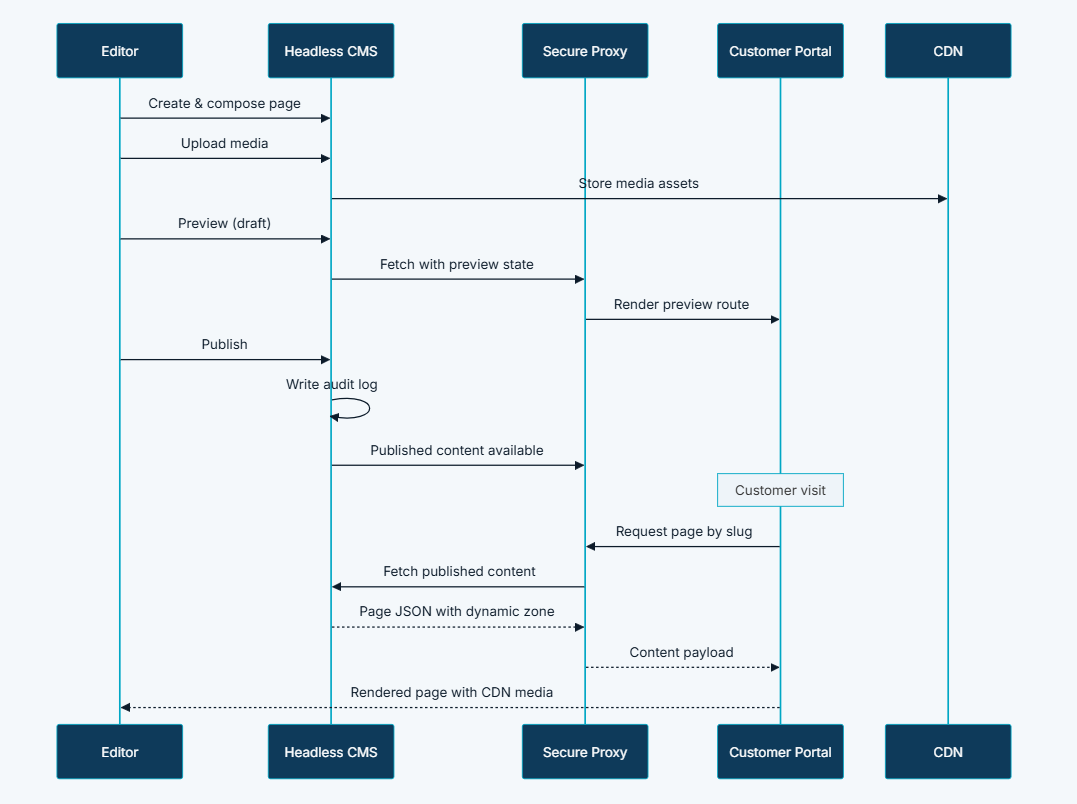
- Draft, Preview, and Publish Workflow — content editors work in draft state, preview on the live portal via dedicated preview routes, and publish when approved; audit logging tracks all create, update, and delete actions
- Hero Banner Scheduling — promotional banners support publish-from and publish-to date ranges, enabling time-bound campaigns without manual intervention
- SEO and Social Metadata Management — meta titles, descriptions, keywords, and Open Graph social sharing tags managed per page alongside content
- URL Slug Management — automatic slug generation from page names with uniqueness enforcement for clean, readable URLs across all published content
- Redirect Management — URL redirect rules managed through CMS plugin, maintaining link integrity when pages are reorganised or renamed
- Navigation Menu Management — hamburger menu and navigation structures managed through CMS without code changes
- CDN-Backed Media Delivery — images, PDFs, and videos uploaded through CMS admin stored on cloud CDN with responsive image breakpoints for optimal loading across devices
- Global Search Configuration — CMS-managed configuration for pages included in site-wide search indexing
- Sitemap Generation — published pages automatically included in XML sitemap generated by the Customer Portal SSR server
Visual Language
The content management interface was designed to give marketing editors confidence — not complexity. The template library presented components visually so editors could select and compose pages without understanding the underlying markup. The preview route rendered the exact customer-facing output before publication, eliminating the gap between what editors saw in the CMS and what customers experienced on the portal. Banner scheduling used date pickers with clear active-period indicators so editors could set up time-bound campaigns in one action and walk away, trusting the platform to activate and deactivate automatically.
Wireframes & Early Ideas
Early wireframes focused on the content editor workflow — specifically the moment of selecting a template and composing a page from components. The dynamic zone concept, where editors add and reorder content blocks from a defined library rather than editing free-form HTML, was established during the first wireframing session as the only approach that could simultaneously give editors creative flexibility and guarantee brand consistency. The preview route was scoped as a first-class feature from the outset — not a nice-to-have addition — because the business had experienced too many customer-reported content errors under the previous process. Redirect management was added to the scope after discovery revealed how much SEO damage previous site reorganisations had caused without it.
Designing Solutions
Problem: Developer-dependent publishing — marketing waits days or weeks for simple page updates
- Built a headless CMS with a dynamic zone template library of over twenty reusable components — marketing editors compose, preview, and publish pages entirely independently of engineering, with no developer ticket required for any routine content operation
- Navigation menu management, banner updates, redirect rules, and SEO metadata are all CMS-managed — the full scope of day-to-day content operations is self-service for business teams
Problem: No preview capability — content published blind with errors discovered by customers
- Implemented dedicated preview routes on the Customer Portal that render unpublished draft content exactly as it will appear to customers — editors review and approve before any content goes live
- Draft-and-publish workflow enforces a review state for all content — no path to publication that bypasses preview
Problem: Static promotional content — homepage banners and campaigns require code changes to update
- Built hero banner scheduling with publish-from and publish-to date range support — editors configure time-bound campaigns in advance and the platform activates and deactivates banners automatically on defined dates without manual intervention or developer involvement
Problem: Broken links on reorganisation — URL changes without redirect management damage SEO and user experience
- Implemented redirect management through a CMS plugin — URL redirect rules are created and managed by editors when pages are reorganised or renamed, maintaining link integrity and protecting SEO rankings without requiring a code deployment
- Automatic slug generation with uniqueness enforcement prevents duplicate URLs from being created in the first place
Problem: Disconnected SEO management — meta tags and social sharing images managed separately from content
- Integrated meta titles, descriptions, keywords, and Open Graph social sharing tags into the page authoring interface — SEO metadata is managed per page alongside content as a single editorial action, not a separate process in a separate tool
- Published pages are automatically included in the XML sitemap generated by the Customer Portal SSR server, ensuring search engine indexing without manual sitemap maintenance
Problem: No audit trail — editorial changes untracked with governance gaps in regulated communications
- Implemented lifecycle hooks writing audit records on all content mutations — every create, update, and delete action is logged with timestamps and user attribution, providing a complete editorial history for governance and compliance review
Tech & Implementation
- Headless CMS: Content authoring, dynamic zone template library, media upload and management, draft and publish workflow, redirect plugin, navigation menu management, and audit logging
- Secure Proxy Layer: Authenticated content fetch from CMS, query parameter forwarding, and cache management between CMS and Customer Portal
- Customer Portal: Page rendering via template component mapping, dedicated preview routes, XML sitemap generation, and redirect rule application
- CDN: Global media delivery with responsive image formats optimised for device breakpoints
- Headless architecture: Full decoupling of content from presentation — publishing never requires a development release
- Deep content population: Fetching nested component relationships in a single API request for efficient page rendering
- REST API caching: Frequently accessed content types cached to maintain portal performance under load
- Custom preview URL generation: Category-aware routing ensuring preview URLs match the final published URL structure exactly
- Responsive image plugin: Generating multiple breakpoints at upload time for optimal loading across all device sizes
- Lifecycle hooks: Writing audit records on all content mutations for governance and change tracking
- SSR-integrated sitemap generation: Published page inventory automatically compiled into XML sitemap by the Customer Portal server-side rendering layer
Real-world Features & Highlights
- Dynamic zone template library with 20+ components → hero banners, accordions, staff contact tables, policy documents, image galleries, tabbed content, card layouts, video embeds, PDF viewers, map and address blocks
- Draft, preview, and publish workflow → content reviewed and previewed on the live portal before going live, errors caught before customers see them
- Hero banner scheduling → publish-from and publish-to date ranges for automated time-bound campaign activation and deactivation
- Category-based content organisation → about us, resources, latest news, and general categories with category-aware URL routing
- SEO and Open Graph metadata management → meta titles, descriptions, keywords, and social sharing tags managed per page alongside content
- URL slug management → automatic generation with uniqueness enforcement for clean, readable URLs
- Redirect management → CMS-managed redirect rules maintaining link integrity on page reorganisation without code changes
- Navigation menu management → site information architecture controlled through CMS without engineering involvement
- CDN-backed media delivery → images, PDFs, and videos served globally with responsive image breakpoints
- Audit logging → all create, update, and delete actions logged with timestamps and user attribution for governance compliance
- XML sitemap generation → published pages automatically included in sitemap for search engine indexing
- Global search configuration → CMS-managed control over which pages are included in site-wide search indexing
Results & Impact
- Faster publishing: Content published in minutes, not days — no developer ticket required for any routine content operation
- Reduced manual effort: Marketing teams self-serve page creation, banner updates, campaign scheduling, and redirect management entirely independently of engineering
- Better customer experience: Consistent, responsive, professionally designed pages across all content — template-driven composition eliminates brand inconsistency from ad-hoc HTML
- Improved SEO visibility: Per-page SEO metadata management and automatic sitemap integration improve search engine discoverability across all published content
- Market agility: Promotional banners, news articles, service announcements, and policy updates deployed at business speed — the platform responds to market changes in hours, not weeks
- Governance and compliance: Audit trail and draft-preview-publish workflow support regulated communications with full editorial accountability
Challenges & Learnings
- Template library scope management — defining the right set of reusable components required balancing editorial flexibility with design system consistency; too few templates constrained marketing creativity, too many created decision fatigue and brand drift; arriving at the right library took iterative discovery with actual content editors
- Preview route accuracy — ensuring preview rendered identically to production required the proxy layer to handle all the same caching, routing, and component mapping logic as the live portal; a preview that looked different from production would have undermined editor confidence in the entire workflow
- CDN cache invalidation on publish — clearing the right cache entries when content was published without degrading portal performance for content that had not changed required careful cache key design; over-invalidation caused unnecessary performance impact, under-invalidation left stale content visible to customers
- Redirect management adoption — editors accustomed to raising tickets for URL changes needed guidance on when and how to create redirect rules themselves; building clear prompts into the page rename and delete workflows helped drive adoption without making it a separate process to remember
- Audit log granularity — determining the right level of audit detail required balancing governance completeness with storage and query performance; logging every field change for every content type at scale required careful indexing strategy to keep audit queries fast
Takeaways
- Decoupling content from code is a strategic capability, not just a technical choice: The moment marketing teams could publish independently of engineering release cycles, content agility became a competitive differentiator — the carrier could respond to market changes in hours rather than waiting for the next sprint
- Templates are a design system investment: A well-designed template library enforces brand consistency at scale without restricting editorial creativity — every page published through the library inherits responsive design, accessibility, and visual coherence automatically
- Preview is a trust feature, not a convenience: Editors who can see exactly what customers will see before publishing make fewer errors and take more editorial initiative — the preview route paid for itself by eliminating post-publication correction cycles
- SEO-native beats SEO-adjacent: Managing meta tags and social sharing images within the page authoring interface, rather than in a separate tool or process, meant SEO was consistently maintained rather than sporadically remembered
- Audit trails protect the business, not just the IT team: In a regulated communications environment, knowing exactly what changed, when, and by whom is not an internal governance nicety — it is a business risk management requirement that the platform needed to provide by default
Next Steps
- Localisation and multi-language content support for regional market communications across the carrier's international trade lanes
- AI-assisted content generation for draft page copy and SEO metadata suggestions based on page category and template selection
- Content performance analytics showing page views, search ranking changes, and engagement metrics alongside editorial activity in the CMS dashboard
- Approval workflow for regulated content types requiring sign-off before publication — extending the draft-and-publish model with a formal review step
- Personalised content delivery serving different page variants to authenticated shippers based on their trade lane, region, or customer segment
Content Template Reference
The dynamic zone template library covers the full range of carrier content needs:
- Hero banner with CTA buttons — homepage promotions, service landing pages
- Accordion with image — FAQ sections, detailed service descriptions
- Staff contact table — regional office contacts, team directories
- Policy template — terms and conditions, booking policies
- Latest news section — homepage news feed with auto-populated articles
- Quick access cards — homepage shortcut links to key services
- PDF viewer — schedules, tariffs, regulatory documents
- Map and address — office locations with embedded maps
- Card with text and icon — service feature highlights
- Tabbed content — multi-section pages with organised navigation
More Partner Shipping modules
Each capability is a self-contained module within the same platform ecosystem.
Client Feedback
"Before the Content Management module, every page update required a developer ticket and a wait. Now our marketing team publishes service announcements, campaign banners, and policy updates the same day decisions are made. The preview capability means we catch errors before customers see them, and the scheduling feature has completely changed how we run time-sensitive promotions. For the first time, our digital presence moves at the speed of our business."
— Marketing Director, Partner Shipping Company
The Content Management module transforms the Customer Portal from a static application into a living digital presence that marketing teams control directly. For Container Shipping, this means the ability to communicate service changes, regional news, and promotional campaigns at the speed of the market — without engineering bottlenecks or brand inconsistency.
Call to Action
If you're looking to give your marketing team full content publishing autonomy — without sacrificing brand consistency, SEO governance, or editorial oversight — contact us at WhizCloud — we'd love to partner with you.
Contact Us