Authentication & User Management
Implementing Secure, Role-Based Access and Seamless Authentication Across Commercial Transactions, Claims Management, Regulatory Workflows, and Customer Self-Service Experiences
TL;DR
We built the Authentication & User Management module for Partner Shipping — a platform-wide identity layer providing secure registration with email verification, encrypted session management, optional two-factor authentication, role-based access control, business account activation with team invitations, and cross-portal single sign-on across the Customer Portal and Claims Portal. Business value delivered: trusted digital relationships, controlled administrative access, reduced account-related support, and seamless cross-module user experience.
Problem Overview
Identity and access challenges in B2B logistics platforms create both security risk and experience friction. For a carrier handling commercially sensitive shipment data and regulatory documents, identity is both a security imperative and a customer experience foundation.
- Weak or shared credentials — unauthorised access to commercial transactions and shipment data
- No role separation — admin capabilities exposed to standard users, or claim handlers granted excessive platform access
- Disconnected portal logins — customers re-authenticate when moving from booking management to claims filing
- Manual account provisioning — business customers wait for operations to create team accounts
- No verification on registration — invalid or fraudulent accounts enter the system undetected
- Session interruption during long workflows — multi-step booking or claim submissions lost when sessions expire unexpectedly
- No admin tooling — platform administrators lack self-service user management capabilities
Role & Responsibilities
- Role: Full-stack development team
- Responsibilities:
- Design and build Authentication & User Management as a platform-wide identity layer serving all Partner Shipping applications
- Implement secure registration with OTP and verification link email confirmation
- Build encrypted session management with industry-standard token authentication stored in secure HTTP-only cookies
- Implement optional two-factor authentication for security-conscious enterprise customers
- Design and enforce role-based access control across standard user, platform administrator, claim administrator, and compliance administrator roles
- Build route and API protection with authentication and role validation independent of client-side guards
- Implement business account activation with team invitation workflows via secure email links and company codes
- Build self-service profile management, password change, and email verification for contact changes
- Deliver admin user management interfaces for authorisation, role assignments, deactivation, and admin privilege grants
- Implement cross-portal single sign-on between Customer Portal and Claims Portal via secure token validation
- Build secure password recovery with token expiration and self-service reset
- Implement account deactivation and reactivation request workflow
- Build bot protection on registration and login forms and blocked domain list for disallowed email domains
- Implement automatic session renewal preventing workflow interruption during multi-step processes
- Deliver audit logging for login activity and role changes for security review
Project Context
- Client: Global container shipping carrier — Partner Shipping Company
- Industry: Maritime logistics — B2B customer identity, access control, and account lifecycle management
- Purpose: Establish a trusted identity foundation across the Partner Shipping ecosystem — enabling shippers, administrators, claim handlers, and compliance officers to access exactly the capabilities they need, securely and without friction, across every portal and workflow in the platform
- Constraints: Identity must operate as a platform-wide service — not per-module authentication; cross-portal SSO essential to prevent session disruption when users move between Customer Portal and Claims Portal; role validation must enforce access at API level independent of client-side guards; session renewal must prevent workflow interruption during long multi-step submissions; bot protection required on all public-facing authentication surfaces
My Approach
We designed Authentication & User Management as a platform-wide identity layer — not a feature within any individual module — because identity is the prerequisite for every other capability in the platform. The architecture was built around the principle that security and usability are not in tension; they are both achievable when identity is designed correctly from the start. Enterprise-grade security — encrypted tokens, role enforcement at the API layer, 2FA, bot protection — was delivered alongside consumer-grade usability — self-service registration, cross-portal SSO, automatic session renewal, and team invitation workflows.
- Security by design: Encrypted token authentication, secure HTTP-only cookie storage, API-level role enforcement, and bot protection designed in from the first architecture decision — not added as hardening steps after the fact
- Self-service as the default: Registration, password recovery, profile management, and team invitations all designed for self-service — reducing account-related support tickets and operations team dependency
- Role-based from the ground up: Access control designed around four distinct role profiles — standard user, platform administrator, claim administrator, compliance administrator — each with precisely scoped permissions rather than a binary authenticated or not model
- Cross-portal coherence: Single identity across Customer Portal and Claims Portal via token-based SSO — shippers move between booking management and claims filing without re-authenticating
Research & Insights
Key Findings from Discovery
- Credential sharing between team members was the most common access control gap identified — business account team invitation workflows with individual credentials were the direct response
- Session expiry during multi-step booking submissions was one of the most frequently reported sources of customer frustration — automatic token renewal during extended sessions was the highest-priority session management requirement
- Operations teams were manually provisioning accounts for business customers who needed multiple team members — a significant overhead that self-service business account activation and team invitation would eliminate
- Re-authentication when moving from the Customer Portal to the Claims Portal was creating friction for shippers who needed to both manage bookings and file claims — cross-portal SSO was a clear requirement, not a nice-to-have
- No email verification at registration meant fraudulent and mistyped accounts were entering the system regularly — verification before activation was essential for data integrity
Competitive Research
- Most carrier portals implemented authentication as a basic username and password gate with no role separation — claim handlers, administrators, and standard shippers accessed the same interface with no capability scoping
- Business account management and team invitation workflows were absent from all comparable carrier self-service tools — team access was universally managed by operations teams manually
- Cross-portal SSO was not standard in the maritime carrier space — separate authentication for booking and claims portals was the norm, requiring customers to manage separate credentials and sessions
User Persona
- Name: Thomas
- Role: IT and Operations Manager, enterprise B2B shipper
- Goals: Onboard his team onto the platform without raising support tickets, control which team members have access to which capabilities, ensure sessions remain active during long booking submissions, allow team members to move between booking management and claims without re-logging in
- Pain Points: Manual account creation requests to operations, shared credentials between team members, sessions expiring during multi-step form completion, re-authentication when switching between portals
Information Architecture
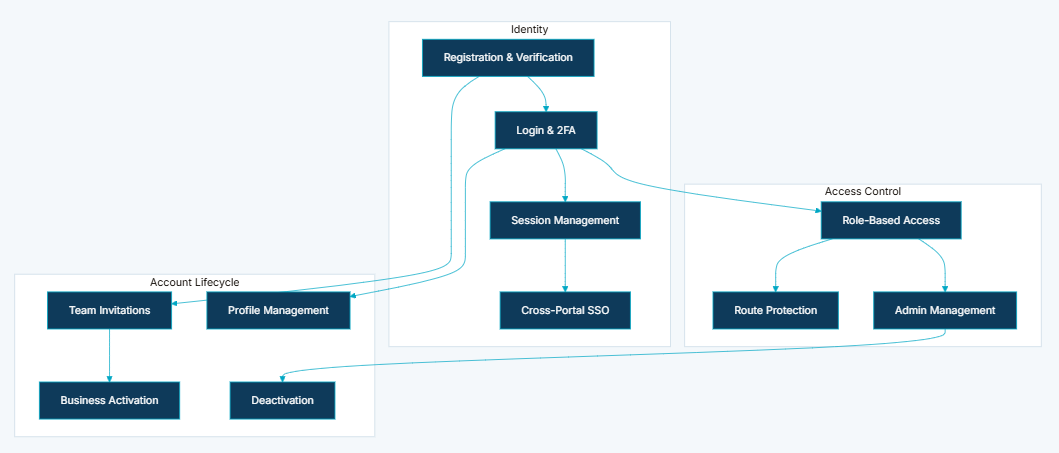
- Secure Registration with Email Verification — account creation requires valid email verification via OTP or verification link before activation; prevents fraudulent or mistyped registrations from entering the system
- Encrypted Session Management — authentication tokens issued with industry-standard encryption, stored in secure HTTP-only cookies; automatic token renewal during extended sessions prevents workflow interruption
- Two-Factor Authentication — optional additional verification step for login; supports security-conscious enterprise customers and regulatory expectations
- Role-Based Access Control — four distinct role profiles with precisely scoped access:
- Standard user — quotes, bookings, dashboard, address book, account settings
- Platform administrator — user management, authorisation, admin deactivation
- Claim administrator — claims review dashboard, settlement, enterprise handoff, claim admin management
- Compliance administrator — sanctions and regulatory workflows
- Route and API Protection — authenticated routes guarded at application level; API endpoints enforce required authentication and role validation independently of client-side checks
- Business Account Activation — company-level registration with team invitation workflows; business account holders invite colleagues via secure email links with company codes
- User Profile and Account Management — self-service profile updates, password changes, email verification for contact changes, and address book management
- Admin User Management — platform administrators manage user authorisation, role assignments, account deactivation, and admin privilege grants through dedicated admin interfaces
- Cross-Portal Single Sign-On — authenticated sessions on the Customer Portal transfer seamlessly to the Claims Portal via secure token validation — one identity across the ecosystem
- Password Recovery — secure reset link workflow with token expiration; self-service recovery without support intervention
- Account Deactivation and Reactivation — administrative deactivation with reactivation request workflow for account lifecycle governance
Visual Language
The authentication interfaces were designed to feel trustworthy and friction-free — two qualities that rarely coexist in enterprise security products. Login and registration modals were compact and focused, presenting only the fields required at each stage without overwhelming new users with the full scope of the platform's security model. Two-factor verification was positioned as a brief, clear step between credential entry and dashboard access — not a disruptive checkpoint. The admin user management interface was designed to give platform administrators confidence that every action — role assignment, deactivation, privilege grant — was explicit and auditable, with clear confirmation states for every operation that changed access rights.
Wireframes & Early Ideas
Early wireframes focused on three critical flows: the registration and verification sequence, the business account invitation workflow, and the cross-portal SSO transition. The registration flow was prototyped to confirm that OTP verification felt fast enough not to discourage completion — a verification step that felt like a barrier would have increased registration abandonment. The business invitation workflow was scoped during wireframing after discovery revealed that team onboarding was consuming significant operations team capacity; designing this as a self-service flow for business account holders rather than an operations-managed process was the wireframing decision that most reduced the support overhead. The cross-portal SSO transition was prototyped to validate that it was imperceptible to the user — shippers should navigate from the Customer Portal to the Claims Portal and simply find themselves authenticated, without any visible token exchange or re-authentication prompt.
Designing Solutions
Problem: Weak or shared credentials — unauthorised access to commercial transactions and shipment data
- Implemented industry-standard encrypted token authentication with secure HTTP-only cookie storage — eliminating credential sharing incentive by making individual account creation and invitation fast and self-service
- Business account team invitation workflow gives each team member their own verified credential tied to the company account, removing the operational driver for credential sharing
Problem: No role separation — admin capabilities exposed to standard users or claim handlers granted excessive platform access
- Designed four precisely scoped role profiles — standard user, platform administrator, claim administrator, and compliance administrator — each with access limited to the capabilities their role requires
- Role enforcement implemented at the API level independently of client-side guards — access cannot be escalated by bypassing the front-end interface
Problem: Disconnected portal logins — customers re-authenticate when moving from booking management to claims filing
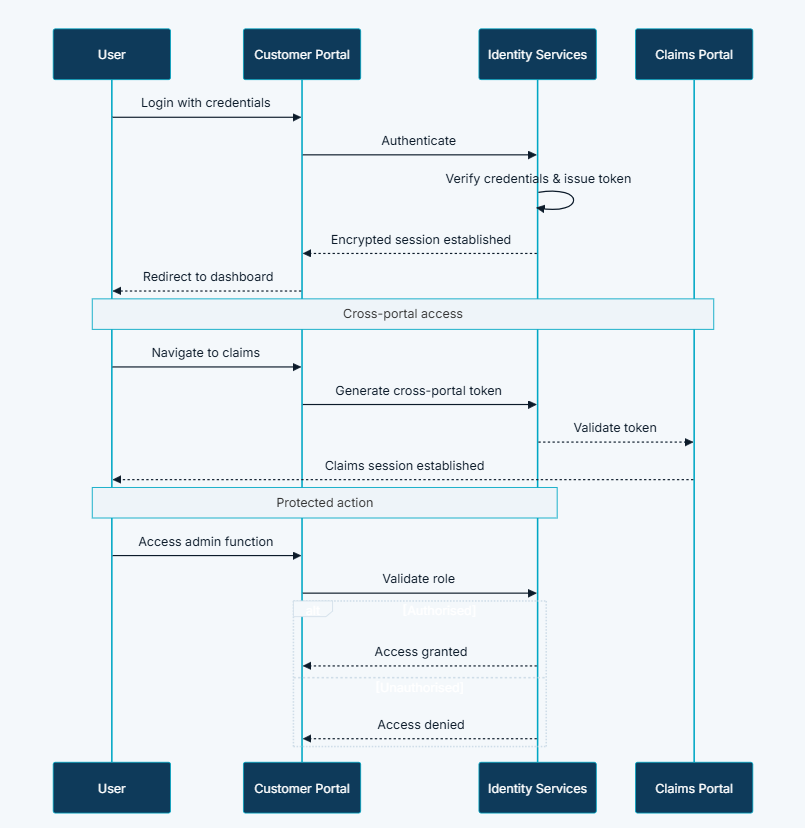
- Built cross-portal single sign-on via secure token validation — authenticated sessions on the Customer Portal transfer seamlessly to the Claims Portal without re-login, creating one identity across the full platform ecosystem
Problem: Manual account provisioning — business customers wait for operations to create team accounts
- Delivered self-service business account activation with team invitation workflows — business account holders invite colleagues via secure email links with company codes, associating new users with the business account without any operations team involvement
- Admin role assignment is also self-service for platform administrators — new team members can be granted appropriate access immediately after registration without raising a ticket
Problem: No verification on registration — invalid or fraudulent accounts enter the system undetected
- Implemented email verification via OTP or verification link as a mandatory gate before account activation — unverified accounts cannot access any platform capability
- Bot protection on registration and login forms and a blocked domain list preventing registration from disallowed email domains provide additional intake integrity controls
Problem: Session interruption during long workflows — multi-step submissions lost when sessions expire unexpectedly
- Implemented automatic token renewal during extended sessions — shippers completing multi-step booking or claim submissions never encounter an unexpected session expiry that loses their progress
- Dual-tier access model provides optional authentication for public routes and required authentication for user routes — unauthenticated users are redirected to login with return URL preservation rather than losing context
Problem: No admin tooling — platform administrators lack self-service user management capabilities
- Built dedicated admin interfaces for user authorisation, role assignment, account deactivation, and admin privilege grants — platform administrators manage the full account lifecycle without requiring developer or operations support
- Audit logging for login activity and role changes gives administrators a security review trail for every access control decision
User Journeys
Registration and First Login
- Stage 1: Shipper submits registration form with company and contact details → platform creates account and sends verification email
- Stage 2: Shipper verifies email via OTP or verification link → account activated and login enabled
- Stage 3: Shipper logs in with credentials → encrypted session issued and redirect to dashboard
- Stage 4 (optional): Shipper completes two-factor verification → additional security layer applied for sensitive accounts
Business Account and Team Management
- Stage 1: Business account holder initiates activation → platform validates company credentials
- Stage 2: Business account holder sends team invitations via email link → pending invitations created with company code
- Stage 3: Invited user registers via invitation link → user associated with business account
- Stage 4: Admin assigns roles to team members → role-based permissions applied
Cross-Portal Access
- Stage 1: Authenticated user navigates to Claims Portal → cross-portal authentication token generated
- Stage 2: Claims Portal validates token → session established without re-login
- Stage 3: User accesses claims workflow → full claims capabilities available under existing identity
Tech & Implementation
- Customer Portal: Login and signup modals, route guards, admin interfaces, profile management, invitation flows
- Claims Portal: Authentication modals, cross-portal token validation, claim admin role enforcement
- Integration Platform: Credential verification, token issuance and renewal, role validation, invitation management, audit logging
- External Services: Email delivery for verification, password reset, and invitation notifications
- Industry-standard encrypted token authentication: Secure cookie storage with HTTP-only flags preventing client-side script access
- Dual-tier access model: Optional authentication for public routes, required authentication for user routes — with return URL preservation on redirect
- Automatic session renewal: Preventing workflow interruption during multi-step booking and claim submission processes
- Role middleware: Enforcing access at API level independent of client-side guards — server-side enforcement cannot be bypassed
- Cross-domain authentication bridge: Between Customer Portal and Claims Portal for seamless cross-portal SSO
- Bot protection: On registration and login forms to prevent automated account creation
- Blocked domain list: Preventing registration from disallowed email domains
- Audit logging: Login activity and role changes logged for security review and compliance
Real-world Features & Highlights
- Secure registration with email verification → OTP or verification link gates account activation; fraudulent and mistyped accounts cannot enter the system
- Encrypted session management → industry-standard token authentication in secure HTTP-only cookies with automatic renewal during extended sessions
- Optional two-factor authentication → additional verification layer for security-conscious enterprise customers and regulatory expectations
- Role-based access control → four precisely scoped role profiles; standard user, platform administrator, claim administrator, compliance administrator
- API-level role enforcement → access validated server-side independently of client-side guards — cannot be bypassed through front-end manipulation
- Business account activation and team invitations → self-service company-level registration with secure email invitation links and company codes
- Self-service profile and account management → profile updates, password changes, email verification for contact changes, and address book management
- Admin user management interfaces → authorisation, role assignments, deactivation, and admin privilege grants without developer involvement
- Cross-portal single sign-on → seamless session transfer from Customer Portal to Claims Portal via secure token validation
- Secure password recovery → reset link with token expiration; self-service without support intervention
- Account deactivation and reactivation → lifecycle governance for business accounts and team members
- Bot protection and domain blocking → registration and login form integrity controls preventing automated and fraudulent account creation
Results & Impact
- Faster processing: Self-service registration and password recovery reduce account-related support tickets — shippers onboard and recover access independently
- Reduced manual effort: Business invitation workflows eliminate manual account provisioning by operations teams — team onboarding is fully self-service for business account holders
- Better customer experience: Seamless cross-portal SSO and automatic session renewal prevent workflow interruption — shippers move between portals and complete long submissions without re-authentication
- Improved visibility: Admin dashboards provide account lifecycle visibility for platform governance — administrators see user status, role assignments, and access history
- Security assurance: Role-based access and optional 2FA meet enterprise customer security expectations — commercially sensitive shipment data accessed only by appropriately credentialed users
- Audit compliance: Login activity and role changes logged for security review — a complete access control audit trail for governance and incident investigation
Challenges & Learnings
- Cross-portal SSO token security — the cross-domain authentication bridge between Customer Portal and Claims Portal required a token design that was short-lived and single-use, preventing token replay attacks without creating the re-authentication friction the SSO was designed to eliminate
- Role enforcement at API vs application layer — ensuring that role validation ran fully server-side and could not be bypassed by client-side manipulation required every protected endpoint to validate role independently; any gap between application-level guards and API-level enforcement was a privilege escalation risk
- Business invitation UX — the invitation flow needed to work for invited users who had never registered before as well as for existing users being added to a business account; designing a single invitation link experience that handled both cases without confusion required careful state management
- Automatic session renewal without security compromise — renewing tokens automatically to prevent workflow interruption had to be balanced against the security principle of not extending sessions indefinitely; designing a renewal policy that reflected actual user activity rather than calendar time was the key design decision
- Bot protection calibration — protection aggressive enough to block automated registration needed to be calibrated carefully to avoid creating false positives that blocked legitimate customers, particularly those accessing from shared corporate networks with high request volumes
Takeaways
- Identity is the trust foundation, not a feature: Every other module's security and usability depends on the quality of the identity layer; authentication designed as a platform-wide service rather than a per-module afterthought delivered coherence and security that per-module implementations could not have achieved
- Security and usability are not in tension when identity is designed correctly: Encrypted tokens, API-level role enforcement, and 2FA coexist with self-service registration, cross-portal SSO, and automatic session renewal — the security model was designed to be invisible to compliant users and effective against bad actors
- Self-service onboarding is an operations capacity investment: Every business customer who can invite and manage their own team members is an operations ticket that does not need to be raised; the investment in business account activation and team invitation workflows paid back immediately in reduced provisioning overhead
- Cross-portal SSO changes the experience equation: The difference between requiring re-authentication when moving between portals and providing seamless SSO is the difference between a collection of tools and a platform — SSO was not a convenience feature, it was an architectural identity commitment
- Audit trails protect both the platform and the customer: Logging login activity and role changes is not just a compliance requirement — it gives both the carrier and its customers confidence that access control decisions are visible, traceable, and defensible
Next Steps
- Single sign-on integration with enterprise identity providers (SSO via SAML or OAuth) for large business customers who manage identity through corporate identity platforms
- Granular permission management within role profiles — allowing platform administrators to configure custom capability sets for specific team members beyond the four standard role profiles
- Session activity dashboard for business account administrators — showing active sessions, recent logins, and role change history across all team members in the organisation
- Progressive security profile — prompting users to enable 2FA based on account activity patterns and transaction value thresholds
- API key management for enterprise customers requiring programmatic integration with the Partner Shipping platform alongside the web-based customer portal
More Partner Shipping modules
Each capability is a self-contained module within the same platform ecosystem.
Client Feedback
"Authentication and User Management solved problems we had been working around for years. Our enterprise customers can now onboard their teams themselves without raising a single support ticket. Our administrators can manage access without developer involvement. And shippers move between booking management and claims filing without ever being asked to log in again. The security foundation it provides has also given us confidence to handle commercially sensitive transactions digitally — something we were not comfortable doing before."
— Head of Digital Operations, Partner Shipping Company
Authentication & User Management is the trust foundation of the Partner Shipping platform. Without reliable identity services, no booking, claim, or compliance workflow can operate with confidence. By delivering enterprise-grade security with consumer-grade usability — including cross-portal SSO and business team management — Partner Shipping establishes the digital trust required for shippers to conduct commercial transactions online.
Call to Action
If you're looking to build a secure, scalable identity layer that delivers enterprise-grade access control with frictionless customer onboarding and cross-platform single sign-on, contact us at WhizCloud — we'd love to partner with you.
Contact Us