Notifications
Automating Customer Communications Through Event-Driven Notifications That Deliver Timely Updates, Reduce Support Enquiries, and Improve Operational Efficiency
TL;DR
We built the Notifications module for Partner Shipping — a cross-platform event-driven communication layer that orchestrates transactional emails and in-platform alerts across the entire shipment lifecycle. Booking confirmations, quote summaries, claim status updates, settlement offers, document requests, amendment decisions, and account events are all delivered automatically to the right recipient at the right moment — with branded PDF attachments, contextual deep links, and in-platform notification panels surfacing action items in the customer dashboard. Business value delivered: proactive customer communication, reduced support enquiries, faster response to action items, and consistent brand presentation across all touchpoints.
Problem Overview
Communication gaps in digital logistics platforms create predictable support volume and customer frustration. Effective notification is not a nice-to-have feature — it is the mechanism that closes the loop between customer action and platform response.
- No booking confirmation email — customers unsure if submission succeeded, generating a wave of "did you receive my booking?" support calls that consumed operations team capacity
- Claim status changes uncommunicated — customers discovered rejection decisions or settlement offers late, delaying resolution and triggering repeated status enquiry emails
- Document requests without notification — additional evidence submissions were delayed because customers did not know they were required, stalling claims processing for administrators
- Amendment decisions not communicated — customers were unaware when booking changes were approved or rejected, triggering follow-up calls and unnecessary re-submissions
- No in-platform alert for action items — customers had to manually check the dashboard for pending tasks, meaning time-sensitive compliance and claims deadlines were routinely missed
- Inconsistent email formatting — ad-hoc notification emails lacked brand consistency, presenting an unprofessional experience that eroded customer trust in the platform
Role & Responsibilities
- Role: Full-stack development team
- Responsibilities:
- Design and build the Notifications module as the cross-platform communication layer for Partner Shipping
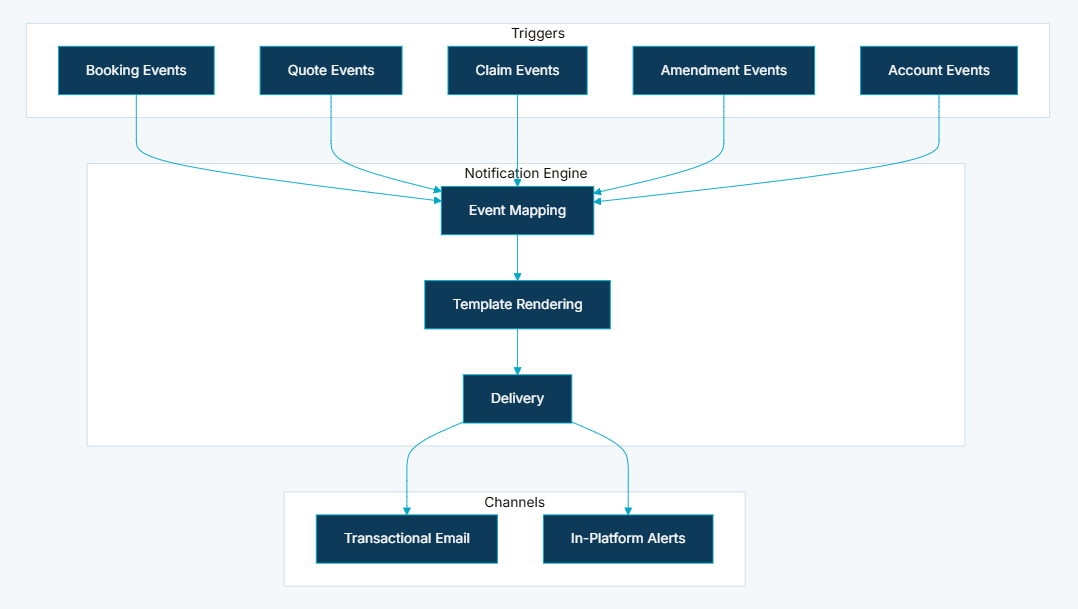
- Implement event-driven architecture triggering notifications on business state transitions across bookings, quotes, claims, and account events
- Build template rendering engine producing branded HTML emails with dynamic transaction data for each notification type
- Deliver dual channel delivery — transactional email for formal communication and in-platform notification panel for action items
- Implement role-aware routing sending appropriately tailored notifications to customers and administrators from the same business event
- Build PDF attachment generation integrated into confirmation notification workflows
- Implement contextual deep links routing email recipients directly to relevant dashboard pages
- Build in-platform notification panel with mark-as-seen workflow in the customer dashboard navigation
- Implement customer event mapping for notification preference configuration
- Build email delivery logging for audit and troubleshooting capability
- Implement asynchronous email delivery to prevent notification processing from blocking transaction response times
Project Context
- Client: Global container shipping carrier — Partner Shipping Company
- Industry: Maritime logistics — customer communications, claims management, and B2B operational notifications
- Purpose: Close the communication loop automatically across every significant business event in the platform — so customers and administrators are always informed of status changes, action requirements, and transaction confirmations without relying on manual relay or support channels
- Constraints: Notifications must be triggered by business state transitions, not manual sends; email delivery must be asynchronous to avoid blocking transaction response times; the same event must generate appropriately different content for customer and administrator recipients; all email delivery must be logged for audit and compliance purposes
My Approach
We designed the Notifications module around the principle that every significant platform event should close its own communication loop — automatically, consistently, and without requiring any manual action from operations staff. The event-driven architecture ensured that notifications were triggered by state transitions in the system rather than by someone remembering to send an email. The dual channel approach — formal transactional email combined with in-platform action alerts — addressed the reality that customers needed both a record of what happened and a prompt to act when something required their attention.
- Event-driven by design: Notifications mapped to business state transitions rather than manual triggers — every qualifying event generates the right communication automatically
- Template-based for consistency: Branded email layouts defined per notification type — no ad-hoc formatting, no brand drift, no variation in presentation across touchpoints
- Dual channel for different needs: Email for formal, record-keeping communication; in-platform alerts for action items that needed to be surfaced at the moment of login
- Role-aware routing: The same business event produces appropriately tailored content for customers and administrators — different recipients, different information, same triggering event
Research & Insights
Key Findings from Discovery
- The highest volume of inbound support calls was "did you receive my booking?" — a category of enquiry that a simple confirmation email would eliminate entirely
- Claims processing was being delayed not by administrator capacity but by customers who did not know additional documents had been requested — document request notifications were the single highest-impact claims workflow improvement identified
- Settlement offers were being accepted late or missed entirely because customers had no proactive notification they had been issued — the commercial consequence of delayed settlement acceptance was significant
- Customers were missing compliance deadlines because in-platform action items were only visible if they logged in and navigated to the right screen — proactive surfacing of action items at login was essential
- Email formatting inconsistency across different notification types was identified by customers as a trust signal — inconsistent presentation made the platform feel unreliable even when the underlying data was accurate
Competitive Research
- Most carrier platforms sent booking confirmation emails but had no notification layer for claims status changes, document requests, or amendment decisions — post-booking communication was almost universally handled by phone or manual email
- In-platform notification panels for action-required items were absent from all comparable carrier self-service tools — customers were expected to proactively check for updates rather than being alerted
- Branded, template-consistent transactional email across the full range of business events — bookings, quotes, claims, accounts — was not standard in the maritime carrier space
User Persona
- Name: Amir
- Role: Logistics Coordinator, B2B shipper managing multiple active shipments
- Goals: Receive immediate confirmation when bookings are submitted, be alerted when claims require his attention, act on settlement offers quickly, never miss a document request or compliance deadline
- Pain Points: No confirmation email after booking submission, discovering claim status changes by manually checking the portal, missing document request deadlines buried in inbox, inconsistent email formatting that undermined trust
Information Architecture
- Transactional Email Delivery — branded, template-rendered emails for every business event delivered via enterprise email service with attachment support for PDFs and documents
- In-Platform Notification Panel — dashboard-integrated notification list showing unread items requiring customer action, accessible from the left navigation panel
- Event Mapping Configuration — customer notification preferences mapped to event types, controlling which events generate in-platform alerts for individual users
- Mark-as-Seen Workflow — customers dismiss notifications after reading, keeping the notification panel focused on actionable items
- Admin and Customer Routing — same business event generates appropriately tailored notifications for customers and administrators with different content and recipients
- Attachment Support — booking confirmations, quote summaries, and claim details delivered as PDF attachments within notification emails
- Contextual Deep Links — email links routing directly to relevant dashboard pages including booking detail, claim detail, and document submission screens
- Email Template Library — consistent branded layouts for each notification category with carrier logo header, transaction summary, call-to-action buttons, and footer with office links and policies
Visual Language
The notification design system was built around two distinct contexts: the email inbox and the in-platform dashboard. Email templates were structured for scanning rather than reading — transaction reference at the top, key status in plain language, a single primary call-to-action button, and a consistent footer. The in-platform notification panel was designed to be glanceable — unread counts visible in the navigation, action items listed with enough context to understand what was required without clicking through, and a mark-as-seen interaction that kept the panel from accumulating noise. Both channels shared the same brand identity, ensuring that a customer moving from an email into the portal experienced a coherent visual transition.
Wireframes & Early Ideas
Early wireframes focused on three moments: the booking confirmation email (the highest-volume notification type), the claims document request notification (the highest-impact in terms of processing speed), and the in-platform notification panel (the most novel feature with no direct precedent in the existing platform). The decision to use deep links routing email recipients directly to the specific dashboard page relevant to the notification — rather than to the dashboard homepage — was made during wireframing after it became clear that requiring customers to navigate after clicking an email link was the most common reason action items were deferred. The dual channel architecture was confirmed during wireframing when discovery revealed that email notifications alone were insufficient for action items with compliance deadlines — the in-platform panel was needed as a persistent reminder at login.
Designing Solutions
Problem: No booking confirmation email — customers unsure if submission succeeded, generating support calls
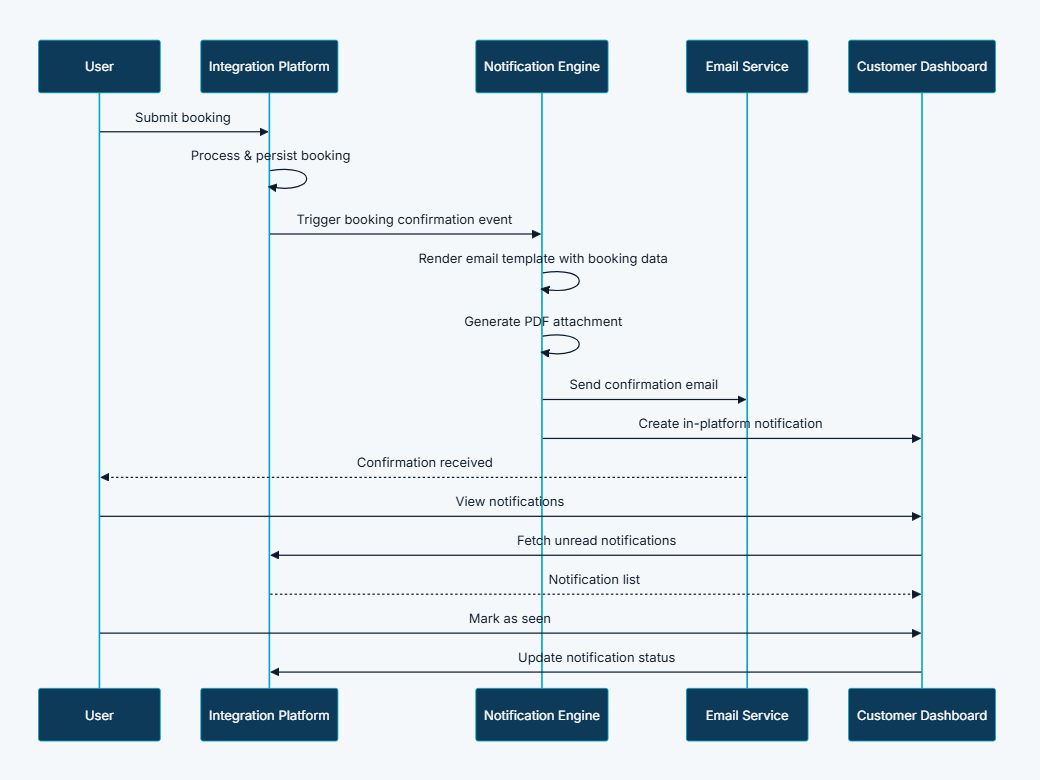
- Built automated booking confirmation email triggered immediately on successful submission — delivering booking reference, summary, and downloadable PDF attachment within minutes of the customer clicking submit
- Amendment approved and rejected notifications close the loop on every post-submission change, eliminating the need for customers to call operations for amendment status
Problem: Claim status changes uncommunicated — customers discovering decisions late
- Implemented the full claims notification lifecycle — claim submitted confirmation, document request alert, settlement offer notification with accept and dispute links, rejection notification with reason, and settlement confirmation — covering every state transition in the claims workflow
- Administrator notifications route claim submissions and customer document responses to the claims team immediately, ensuring no claim sits unreviewed because the administrator was not aware it required attention
Problem: Document requests without notification — additional evidence submissions delayed, stalling claims
- Built a dedicated document request notification that delivers a specific list of required documents with a direct submission link — customers know exactly what is needed and where to upload it without logging in and navigating to find the request
- Administrator notification fires when customers submit requested documents, returning the claim to the review queue immediately without requiring manual checking
Problem: No in-platform alert for action items — time-sensitive tasks missed by customers who did not manually check
- Implemented an in-platform notification panel integrated into the dashboard left navigation — unread action items surface at login so customers see what requires their attention before they navigate anywhere else
- Mark-as-seen workflow keeps the panel focused on genuinely outstanding items, preventing notification fatigue from accumulation of already-read alerts
Problem: Inconsistent email formatting — unprofessional presentation eroding customer trust
- Built a template library of branded email layouts covering every notification category — consistent header with carrier logo, structured transaction summary, clear call-to-action buttons, and standardised footer with office links and policy references
- All notification emails are rendered from the same template engine, ensuring brand consistency is maintained automatically across every event type without manual formatting effort
Tech & Implementation
- Customer Portal: In-platform notification panel in dashboard navigation and mark-as-seen interaction
- Claims Portal: Notification panel for claim-related alerts and admin notification routing
- Integration Platform: Event detection, template rendering, email orchestration, and notification record management
- External Services: Enterprise email delivery service and PDF generation for attachments
- Event-driven architecture: Notifications triggered on business state transitions across bookings, quotes, claims, and account events — no manual sends
- Template rendering engine: Producing branded HTML emails with dynamic transaction data for each notification type
- Asynchronous email delivery: Notification processing decoupled from transaction response — email delivery never blocks the customer-facing submission experience
- PDF attachment generation: Integrated into confirmation workflows for bookings, quotes, and claim summaries
- Customer event mapping: Notification preference configuration controlling which events generate in-platform alerts per user
- Email delivery logging: Full audit trail for delivery status, troubleshooting, and compliance review
- Contextual deep links: Email links routing directly to booking detail, claim detail, and document submission screens in the dashboard
Real-world Features & Highlights
Booking Notifications
- Booking confirmation → customer receives booking reference, summary, and PDF attachment immediately on submission
- Booking amendment submitted → operations team alerted with amendment details for review
- Amendment approved or rejected → customer notified of decision with updated booking details
- Booking cancellation → customer receives cancellation confirmation
Quote Notifications
- Quote confirmation → customer receives quote reference, summary, and PDF attachment
- Quote validity approaching expiry → customer reminded with dashboard link before the quote lapses
Claim Notifications
- Claim submitted → both customer and administrator receive confirmation with claim reference
- Additional documents requested → customer notified with specific document list and submission link
- Settlement offer issued → customer notified with offer terms and accept or dispute link
- Claim rejected → customer notified with reason and claim reference
- Claim settled → customer receives settlement confirmation
- Additional documents submitted → administrator alerted to customer response, claim returned to review queue
- Claim admin invitation → invited administrator receives registration link with role assignment
Account Notifications
- Registration verification → customer receives OTP or verification link
- Password reset → customer receives secure reset link with expiration
- Team invitation → invited user receives company invitation link
- Email or contact change verification → customer receives verification OTP
Results & Impact
- Faster processing: Customers action document requests and settlement offers promptly when notified — claims processing delays caused by customer unawareness are eliminated
- Reduced manual effort: Automated confirmations eliminate "did you receive it?" support enquiries — operations teams are freed from routine status communication
- Better customer experience: Proactive, branded communication builds confidence in platform reliability — customers feel informed and in control rather than waiting in silence
- Improved visibility: In-platform alerts ensure action items are not missed in email noise — compliance deadlines and settlement offers surface at login, not buried in inbox
- Consistent branding: Template-based emails maintain professional presentation across all notification touchpoints — every email a customer receives reflects the same brand identity
- Audit trail: Email delivery logged for compliance and dispute resolution — a complete record of what was sent, when, and to whom for every business event
Challenges & Learnings
- Event mapping complexity across multiple modules — the notifications layer needed to listen for state transitions across bookings, quotes, claims, and account management without creating tight coupling between modules; designing a clean event bus architecture that each module could publish to independently was the foundational engineering challenge
- Asynchronous delivery without delivery guarantee gaps — decoupling email delivery from transaction processing was essential for performance, but required a reliable queuing mechanism to ensure notifications were never lost if the email delivery service was temporarily unavailable
- Role-aware content differentiation — generating different email content for customer and administrator recipients from the same triggering event required a template architecture that could branch on recipient role without duplicating the event handling logic
- In-platform notification panel performance — loading unread notification counts into the navigation panel on every page required careful caching to avoid adding latency to every dashboard interaction; the count had to feel real-time without being expensive to compute
- Deep link accuracy across portal states — email links routing to specific dashboard pages had to remain valid across authentication states; an unauthenticated customer following a deep link needed to be redirected through login and back to the intended page without losing the destination context
Takeaways
- Notifications are the connective tissue of the platform: Every other module's value depends partly on whether customers and administrators are informed when something changes; the notifications layer is what transforms individual transactions into a coherent, trustworthy experience
- Closing the loop eliminates an entire support category: Status enquiry calls — "did you receive it?", "what happened to my claim?", "was my amendment approved?" — exist because communication loops are left open; automating closure of those loops removed the need for those calls entirely
- Dual channel addresses two different customer needs: Email provides a formal record that customers can reference later; in-platform alerts surface action items at the moment of login when customers are ready to act — neither channel alone serves both purposes
- Template consistency is a trust investment: Inconsistent email formatting signals an unreliable system; a branded template library that renders the same visual identity across every notification type builds cumulative trust with every communication sent
- Deep links are the difference between informing and enabling: A notification that tells a customer something requires their attention is useful; a notification that takes them directly to the action they need to complete is what actually drives resolution speed
Next Steps
- Push notification support for mobile application — extending the in-platform alert channel to mobile devices so action items surface even when customers are not logged into the portal
- Customer notification preference management — allowing shippers to configure which event types trigger email notifications and in-platform alerts based on their own operational priorities
- Notification delivery analytics — reporting on open rates, click-through rates, and action completion rates per notification type to identify communication gaps and optimise alert timing
- SMS notification channel for critical time-sensitive events — settlement offer expiry, compliance deadlines, and urgent document requests delivered via SMS in addition to email
- Scheduled digest notifications — daily or weekly summary emails for customers managing high volumes of active bookings and claims who prefer consolidated updates over individual event alerts
More Partner Shipping modules
Each capability is a self-contained module within the same platform ecosystem.
Client Feedback
"Before the Notifications module, our support team spent a significant part of every day answering calls from customers asking whether their bookings had been received or what had happened to their claims. Now those calls simply do not happen. Customers receive confirmations immediately, they are alerted when their claims need attention, and they can act on settlement offers without waiting to hear from us. The in-platform notification panel has been particularly valued — shippers told us that seeing their action items the moment they log in has completely changed how they manage their shipments with us."
— Operations Director, Partner Shipping Company
Notifications are the connective tissue of the Partner Shipping platform — the mechanism that transforms customer actions into confirmed outcomes and keeps both customers and administrators informed without manual relay. By closing the communication loop automatically across every significant business event, Container Shipping reduces support volume while building the proactive, transparent customer relationship that modern logistics demands.
Call to Action
If you're looking to eliminate communication gaps in your customer platform, automate transactional notifications across your full business event lifecycle, and reduce support volume through proactive, branded customer communication, contact us at WhizCloud — we'd love to partner with you.
Contact Us