Customer Dashboard
Creating a Unified Customer Dashboard That Centralizes Quotes, Bookings, Compliance Tasks, and Operational Visibility to Improve Efficiency and Customer Experience
TL;DR
We built the Customer Dashboard for Partner Shipping — the authenticated home base of the platform that aggregates active quotes, confirmed bookings, overview metrics, and navigation to all related workflows — tracking, amendments, electronic shipping instructions, and account settings — in a single, personalised command centre accessible immediately after login. Business value delivered: reduced support enquiries, increased platform stickiness, faster action on pending items, and a professional B2B experience that reflects the complexity of modern shipping operations.
Problem Overview
Shippers operating at scale face a visibility gap that email and phone cannot solve. For Container Shipping, the absence of a unified dashboard meant every repeat interaction started from zero — undermining the platform's value as a relationship tool rather than a one-time transaction channel.
- Scattered transaction records — active quotes in one email thread, confirmed bookings in another, amendment requests in a third
- No at-a-glance status — customers cannot quickly answer "what needs my attention today?"
- Context switching — moving from booking review to tracking to compliance submission requires navigating unrelated interfaces
- Lost action items — document requests, amendment approvals, and compliance deadlines buried in inbox noise
- No historical reference — past quotes and bookings difficult to locate for repeat or similar shipments
- Inconsistent experience — each workflow feels like a separate application rather than a connected platform
Role & Responsibilities
- Role: Full-stack development team
- Responsibilities:
- Design and build the Customer Dashboard as the authenticated home base of the Partner Shipping platform
- Build overview dashboard with summary cards for active quotes, bookings, and recent activity
- Implement filterable, searchable quote list and detail views with PDF download, duplication, and booking conversion actions
- Implement filterable, searchable booking list and detail views with cargo, parties, documents, tracking, amendment, and ESI compliance access
- Integrate Track & Trace within booking detail views — container event timeline alongside booking context
- Build booking amendment access with unsaved-changes protection from booking detail
- Implement ESI compliance workflow accessible from booking detail without leaving dashboard context
- Build extended quote and booking list views for historical records
- Deliver persistent left navigation panel with collapsible mobile-friendly layout
- Integrate notification surfacing for event-driven action-required alerts
- Implement role-gated authenticated access with session persistence
Project Context
- Client: Global container shipping carrier — Partner Shipping Company
- Industry: Maritime logistics — ocean freight, B2B customer self-service, and commercial operations
- Purpose: Transform Partner Shipping from a collection of transactional workflows into a persistent shipper workspace — giving repeat customers a single command centre for quotes, bookings, tracking, and compliance to drive retention, reduce support cost, and position the carrier as a digital-first logistics partner
- Constraints: Dashboard must aggregate data across quotes, bookings, tracking, and compliance without performance degradation; module access — tracking, amendments, ESI — must be contextually available from booking detail without full page reloads; navigation must remain consistent across all platform sections; layout must be responsive for mobile logistics professionals
My Approach
We designed the Customer Dashboard around a single guiding principle: a shipper logging in should immediately know what requires their attention and be able to act on it without navigating away from context. This shaped every structural decision — overview-first layout, drill-down from list to detail, contextual module access within detail views, and persistent navigation that never disappears regardless of where a shipper is in the platform.
- Overview first: The landing screen after login surfaces summary metrics — active quotes, confirmed bookings, recent activity — so shippers have situational awareness before they drill into any individual record
- Drill-down architecture: List views provide searchable, filterable access to all transaction records; detail pages surface everything relevant to a single transaction — documents, tracking, amendments, compliance — without requiring separate navigation
- Contextual actions: Tracking, amendment, ESI compliance, and document retrieval are all accessible from within the booking detail view — shippers act without losing their place
- Persistent navigation: The left panel remains constant across all dashboard sections, giving shippers a stable spatial map of the platform regardless of where they are
Research & Insights
Key Findings from Discovery
- Shippers could not answer "what needs my attention today?" without checking multiple email threads and calling the operations team — a unified action view was the most requested capability in discovery sessions
- Repeat shippers were re-navigating from scratch on every login because there was no persistent workspace that remembered their active transactions
- Context switching between tracking, compliance, and booking management felt like using three separate tools — shippers lost orientation and made errors when re-entering data across disconnected interfaces
- Compliance deadlines (ESI, document submission) were being missed because they arrived by email and were buried in inbox noise with no in-platform reminder or action prompt
- Support teams were handling a high volume of "what is the status of my booking?" enquiries that a dashboard with clear status indicators would eliminate entirely
Competitive Research
- Most carrier portals offered fragmented views — quotes in one section, bookings in another, tracking accessed via a separate URL — with no unified command centre
- ESI and amendment workflows were typically handled by email even when carriers had digital booking tools, creating a disconnect between the digital record and the compliance process
- No competitor surfaced action-required items proactively on login — shippers had to know what to look for rather than being guided to what needed attention
User Persona
- Name: Sarah
- Role: Senior Logistics Manager, high-volume B2B shipper
- Goals: Know immediately on login what requires her attention, access any active quote or booking in two clicks, track shipments without switching tools, submit compliance documents without losing booking context
- Pain Points: Scattered records across email and phone, no at-a-glance status view, compliance deadlines missed in inbox noise, context switching between disconnected interfaces
Information Architecture
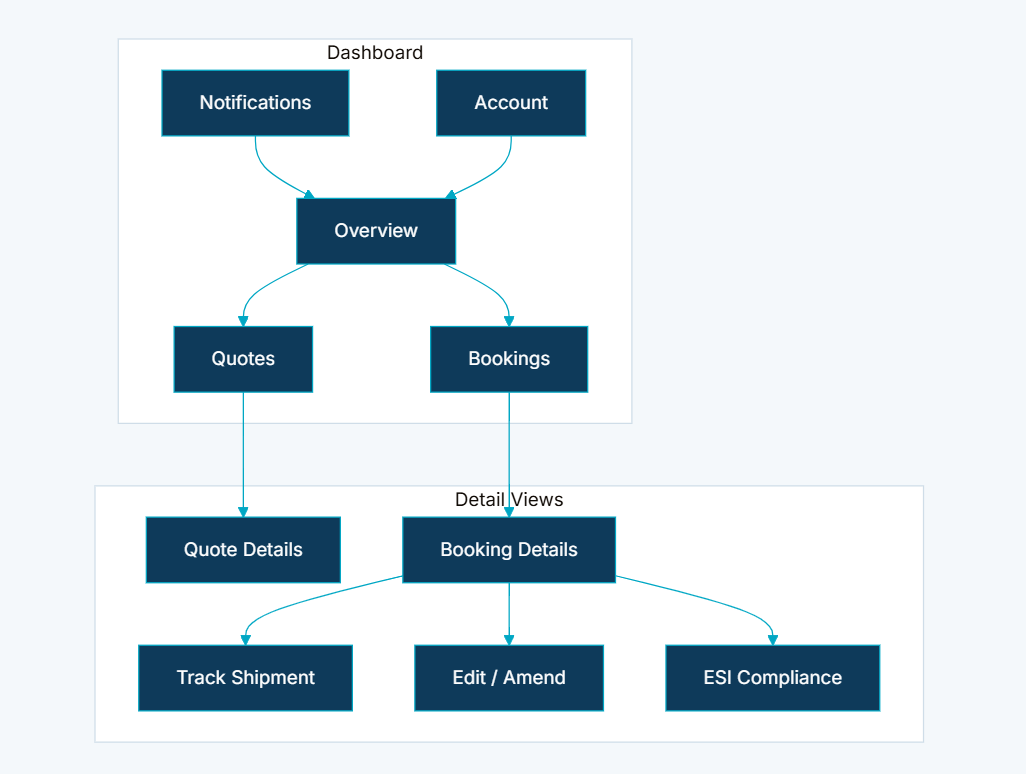
- Overview Dashboard — summary cards displaying active quote count, booking count, and recent activity; first screen after login for immediate situational awareness
- Quote List and Detail Views — filterable, searchable list of all customer quotes; detail pages with full rate enquiry data, status, PDF download, duplication, and booking conversion actions
- Booking List and Detail Views — filterable, searchable list of all customer bookings; detail pages with cargo, parties, documents, tracking, amendment, and ESI compliance access
- Integrated Track & Trace — tracking tab within booking detail views; container event timeline displayed alongside booking context without separate navigation
- Booking Amendment Access — direct navigation from booking detail to amendment workflow with unsaved-changes protection
- ESI Compliance Integration — Electronic Shipping Instructions workflow accessible from booking detail without leaving dashboard context
- Extended Quote and Booking Lists — dedicated views for historical quote and booking records beyond the default active list
- Left Navigation Panel — persistent sidebar with dashboard sections, notification access, account settings, and collapsible mobile-friendly layout
- Notification Integration — dashboard surfaces action-required items linked to the platform notification module for event-driven alerts
Visual Language
The dashboard was designed to feel like a professional B2B command centre — not a consumer app, and not a spreadsheet. Summary cards gave shippers instant situational awareness without information overload. List views used status indicators and filtering to make large transaction histories navigable. Detail pages were structured so that a shipper could see everything relevant to a single booking — cargo, documents, tracking, compliance — in one place without scrolling through unrelated content. The persistent left navigation panel gave the platform a stable spatial identity that shippers could internalise quickly and rely on across sessions.
Wireframes & Early Ideas
Early wireframes centred on the overview landing screen and the booking detail page — the two moments that most determined whether the dashboard would feel like a genuine workspace or just another list view. The decision to integrate tracking, amendment, and ESI compliance as tabs within the booking detail view was made during wireframing after it became clear that shippers needed to cross-reference booking data with tracking events and compliance status simultaneously. Separating them into standalone screens would have recreated the context-switching problem the dashboard was designed to solve. The left navigation panel was designed as a persistent element from the first wireframe — collapsible for mobile, always present on desktop.
Designing Solutions
Problem: Scattered transaction records across email threads with no unified view
- Built a unified dashboard that aggregates all active quotes, confirmed bookings, and recent activity in one authenticated workspace — accessible immediately on login with no navigation required
- Filterable and searchable list views for both quotes and bookings give shippers precise control over large transaction histories without manual searching through email
Problem: No at-a-glance status — customers cannot quickly answer "what needs my attention today?"
- Implemented an overview landing screen with summary cards displaying active quote count, booking count, and recent activity — the first thing a shipper sees after login is their current operational position
- Notification integration surfaces action-required items directly on the dashboard, linked to the platform notification module so compliance deadlines, document requests, and amendment approvals appear as prompts rather than buried emails
Problem: Context switching between tracking, compliance, and booking management across unrelated interfaces
- Integrated tracking, amendment, and ESI compliance as contextual tabs within each booking detail view — shippers access container event timelines, submit compliance documents, and initiate amendments without leaving the booking record
- Persistent left navigation panel maintains spatial orientation across all dashboard sections, so shippers always know where they are and can move between sections without disorientation
Problem: Compliance deadlines and action items buried in inbox noise
- ESI compliance workflow is accessible directly from booking detail — shippers submit Electronic Shipping Instructions without leaving dashboard context, eliminating the email-based compliance step entirely
- Event-driven notification integration surfaces compliance deadlines and document requests as in-platform action items, not inbox messages
Problem: No historical reference — past quotes and bookings difficult to locate for repeat shipments
- Extended quote and booking list views provide access to full historical records beyond the default active list — shippers locate any past transaction using search and filter without contacting the operations team
- Quote duplication and booking conversion are available directly from detail views — repeat shippers initiate similar shipments from historical records in one click
Tech & Implementation
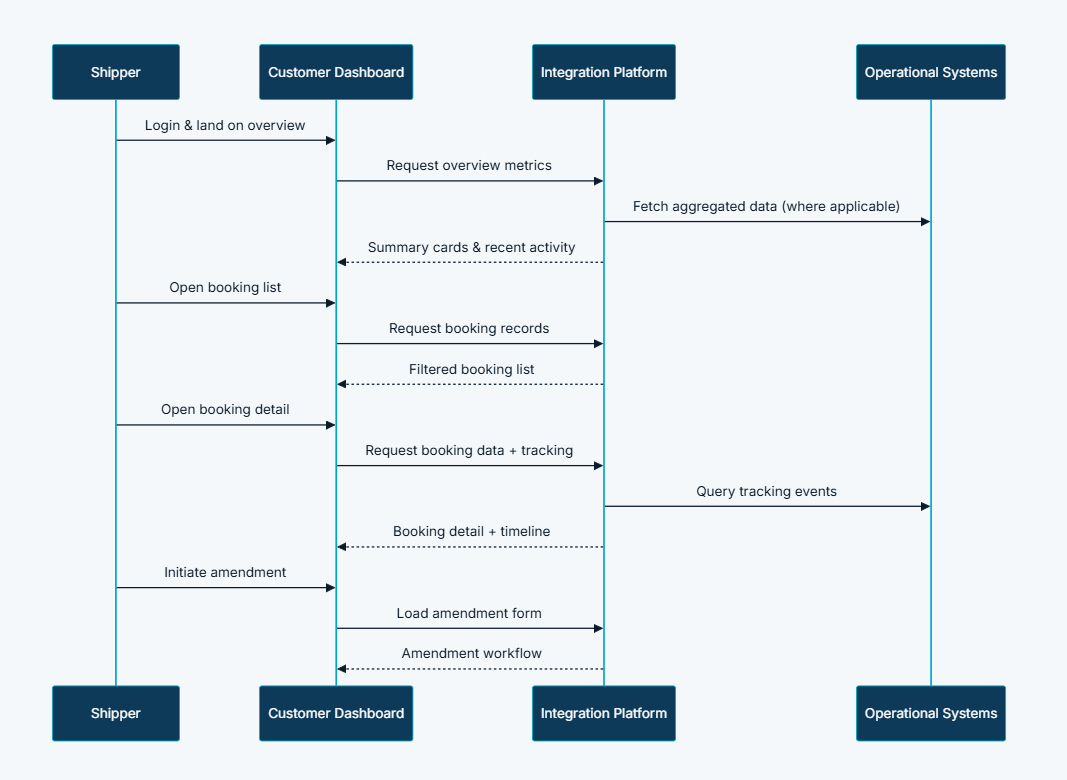
- Customer Portal: Dashboard layout, overview cards, quote and booking list views, detail pages, left navigation panel, tracking tab, amendment editor, and ESI workflow
- Integration Platform: Aggregated dashboard data retrieval, quote and booking record queries, tracking event requests, and amendment orchestration
- Content Management: Help content and FAQ links accessible from dashboard navigation
- External Services: Operational datalake for tracking event data; enterprise systems for dashboard metrics where applicable
- Role-gated authenticated access: Session persistence ensuring shippers return to their dashboard state across sessions
- Aggregated data retrieval: Overview performance optimised to avoid slow load times on the landing screen despite multiple data sources
- Drill-down architecture: List-to-detail navigation without full page reloads, keeping the experience fast and contextually coherent
- Integrated module access: Tracking, amendments, and ESI accessible from booking context without separate navigation or page transitions
- Responsive layout: Collapsible left navigation panel for mobile logistics professionals managing shipments on the go
- Event-driven notification surfacing: Action-required items delivered to the dashboard from the platform notification module in real time
Real-world Features & Highlights
- Overview landing screen → summary cards for active quotes, bookings, and recent activity visible immediately on login
- Quote list and detail views → filterable, searchable records with PDF download, duplication, and booking conversion from detail
- Booking list and detail views → filterable, searchable records with cargo, parties, documents, tracking, amendment, and ESI access from detail
- Integrated Track & Trace → container event timeline as a tab within booking detail, no separate navigation required
- Booking amendment access → direct navigation from booking detail to amendment workflow with unsaved-changes protection
- ESI compliance integration → Electronic Shipping Instructions submitted from booking detail without leaving dashboard context
- Extended historical lists → full quote and booking history beyond the default active view, searchable and filterable
- Persistent left navigation → stable sidebar across all sections, collapsible for mobile
- Notification integration → action-required items surfaced on the dashboard from event-driven platform alerts
- Role-gated access → authenticated session ensuring each shipper sees only their own transaction data
Results & Impact
- Faster processing: Customers locate and action pending items without support assistance — status visible immediately on login
- Reduced manual effort: Support teams handle fewer "status of my booking or quote" enquiries — shippers self-serve from the dashboard
- Better customer experience: Professional B2B command centre matching the expectations of enterprise shippers managing complex freight operations
- Improved visibility: At-a-glance overview and drill-down detail eliminate email thread archaeology for both shippers and operations teams
- Platform stickiness: Dashboard becomes the daily workspace — increasing engagement and self-service adoption across all platform modules
- Cross-sell enablement: Quote duplication and booking conversion accessible from dashboard context accelerate repeat commercial activity
Challenges & Learnings
- Aggregated data performance on the overview screen — pulling summary metrics from quotes, bookings, tracking, and compliance into a single landing screen without slow load times required careful query optimisation and caching strategy; the overview had to feel instant, not like a report being generated
- Contextual module integration within detail views — embedding tracking, amendments, and ESI as tabs within booking detail required the integration layer to handle three different data sources and workflows from a single screen without creating loading or state management complexity
- Responsive navigation for mobile — the persistent left panel that anchors the desktop experience had to collapse elegantly for mobile without losing spatial consistency; designing a collapsible pattern that felt natural rather than degraded on smaller screens required iteration
- Notification surfacing without noise — surfacing action-required items on the dashboard required careful threshold design; too many alerts and shippers ignore them, too few and deadlines are missed; the integration with the notification module had to be selective and prioritised
- Historical list performance — extended quote and booking lists covering months of transaction history required pagination and search optimisation to remain responsive for high-volume shippers with large transaction footprints
Takeaways
- The dashboard is the platform: For repeat shippers, the dashboard is not a feature — it is their entire experience of the carrier; every other module's value depends on how well the dashboard surfaces and connects to it
- Overview-first is a trust signal: A landing screen that immediately shows a shipper their current position — active quotes, confirmed bookings, pending actions — communicates that the platform understands their work, not just their transactions
- Contextual access eliminates the biggest friction: Embedding tracking, amendments, and compliance within booking detail removed more friction than any other single design decision; shippers stopped context-switching and started acting
- Persistent navigation is a spatial investment: The left panel's consistency across all sections gave shippers a mental map of the platform they could rely on; reducing navigation uncertainty reduced errors and increased confidence
- Stickiness comes from utility, not design: Shippers return to the dashboard daily because it gives them genuine operational value — not because it looks impressive; the most important metric for a B2B dashboard is how much time it saves per login, not how many features it contains
Next Steps
- Personalised dashboard configuration allowing shippers to pin their most-used modules and reorder summary cards to match their workflow priorities
- Proactive shipment milestone alerts surfaced as dashboard banners — not just notifications — for time-sensitive events requiring immediate attention
- Team and multi-user dashboard views for logistics teams managing shared booking portfolios across multiple users in the same organisation
- Analytics summary for commercial teams showing quote conversion rates, booking volumes, and shipment activity patterns accessible from the dashboard
- Mobile application bringing the dashboard experience to on-the-go logistics professionals with push notification integration for action-required items
More Partner Shipping modules
Each capability is a self-contained module within the same platform ecosystem.
Client Feedback
"The Customer Dashboard changed how our shippers think about us. Before, every interaction started with an email or a phone call. Now they log in and immediately know where everything stands — their quotes, their bookings, their compliance deadlines. Our support team has seen a significant drop in status enquiries, and our shippers tell us the platform feels like it was built for how they actually work, not just for how we wanted to process transactions."
— Customer Experience Director, Partner Shipping Company
The Customer Dashboard transforms Partner Shipping from a collection of transactional workflows into a persistent shipper workspace. By giving repeat customers a single command centre for quotes, bookings, tracking, and compliance, Container Shipping builds the kind of platform relationship that drives retention, reduces support cost, and positions the carrier as a digital-first logistics partner.
Call to Action
If you're looking to build a unified customer dashboard that transforms fragmented transaction workflows into a persistent, self-service workspace for your B2B customers, contact us at WhizCloud — we'd love to partner with you.
Contact Us